Air Compressor Maintenance Checklist
Pick a piston, rotary screw or tank-and-safety list, choose daily to annual boxes and an optional readings log, then print the checklist or download it as CSV.
Recent
Your last 10 settings, saved only in this browser. Nothing is uploaded.
How to use the air compressor maintenance checklist
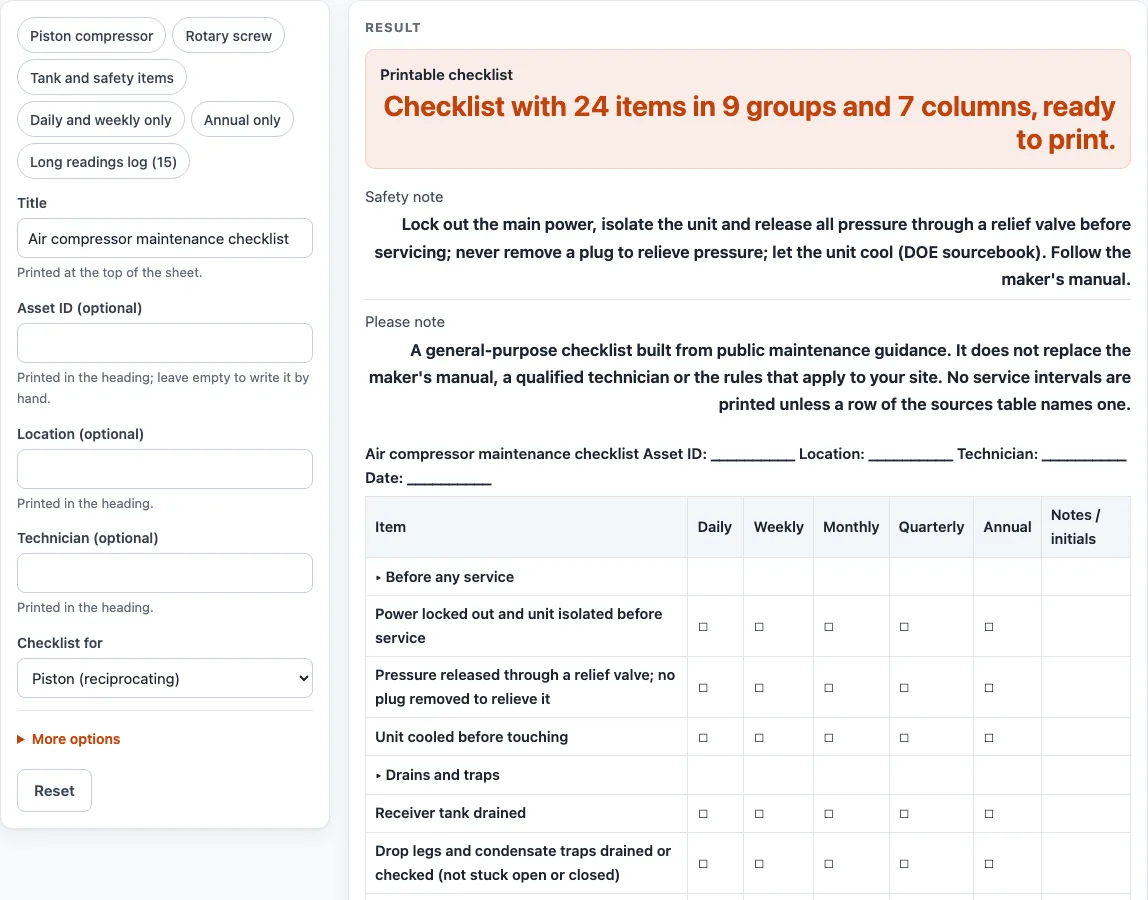
- Change “Title” if you want a different heading. The default is “Air compressor maintenance checklist”, and it prints at the top of the sheet.
- Fill in “Asset ID (optional)”, “Location (optional)” and “Technician (optional)”. Leave any of them empty to write it in by hand.
- Pick a “Checklist for” option: “Piston (reciprocating)”, “Rotary screw” or “Tank and safety items only”. The item list changes to match.
- Set “Blank write-in rows” from 0 to 20 to add empty lines at the end of the items for your own jobs.
- Under More options, switch the “Daily column”, “Weekly column”, “Monthly column”, “Quarterly column” and “Annual column” on or off. Keep “Notes / initials column” on if you want room for notes.
- Decide whether to keep “Add a readings table (hours, pressure)” on, and set “Rows in the readings table” from 1 to 40.
- Switch “Add the table of what public sources say” on or off.
- Select Print / save as PDF to print the sheet, or select “Download as CSV (opens in Excel)” to get every table in one file.
The presets “Piston compressor”, “Rotary screw”, “Tank and safety items”, “Daily and weekly only”, “Annual only” and “Long readings log (15)” fill in the controls for common setups. You can still change any control after choosing a preset. The CSV file is named air-compressor-maintenance-checklist.csv.
What should I check first on an air compressor?
Start with the three steps that come before any service: lock out the main power and isolate the unit, release all pressure through a relief valve, and let the unit cool before touching it. The “Piston (reciprocating)” and “Rotary screw” scopes begin with these items, and the DOE sourcebook is the public source for them. Never remove a plug to relieve pressure.
How often should an air compressor be serviced?
The sheet prints no service intervals, and the sources do not agree on one schedule. For air-cooled piston units, the DOE sourcebook lists lubricant level, drains and visual checks every 8 hours or daily, and relief valves, cooling surfaces, air leaks, intake filters and belt tension every 100 hours or weekly. It also gives longer intervals for lubricant changes, which follow the manufacturer, and every 2,000 hours or 12 months for pressure switch contacts. The sources table shows each source’s wording as written, and the maker’s manual comes first.
Why do hour-based and calendar intervals not match?
Interval wording differs by compressor type. Rotary sources use daily, monthly, 6-month and annual timing, while piston sources often use hours. The sheet keeps five calendar columns, so you may need to convert hour-based guidance into the column that fits your plan. Tick a box only when your manual or plan says the task is due.
What do OSHA and the DOE sourcebook say about receivers and safety valves?
The text of OSHA 29 CFR 1910.169(b) says each air receiver needs a drain pipe and valve at its lowest point, drained frequently, and an indicating pressure gauge that is readily visible. It says safety valves should be tested frequently and at regular intervals, but it gives no number. The DOE sourcebook says to be certain pressure relief valves are working every 100 hours or weekly for piston units, and it defers to manufacturers’ test schedules. The sheet gives no number of its own.
What do the readings table and the records items capture?
The readings table has four columns: “Date”, “Hour meter”, “Discharge pressure” and “Initials”. The rows are blank, and nothing is calculated or judged. The records items ask you to note the hours and to log the date, the work done and any parts replaced. The DOE sourcebook says to record the dates of maintenance and the parts replaced.
Sources (checked 15 October 2026): energy.gov · law.cornell.edu · energy.gov
Worked examples
| Input | Result |
|---|---|
| 7 columns | 24 item rows, 7 columns |
| 7 columns | 25 item rows, 7 columns |
| 5 columns | 18 item rows, 5 columns |
| 5 columns | 24 item rows, 5 columns |
| 6 columns | 24 item rows, 6 columns |
Calculated by the tool above; open it with the same values to see each step.
Frequently asked questions
Does this checklist tell me when my compressor needs service?
No. The sheet is a blank form that records what you find and what you have ticked. Timing should come from the maker’s manual or your own plan, and the sources table shows what public sources say for reference.
Does a completed checklist say my compressor is in good condition?
No. A completed checklist shows only what you recorded. It does not judge the unit or any rule. For those questions, use the maker’s manual, a qualified technician and the rules that apply to your site.
Which “Checklist for” option should I pick?
Choose “Piston (reciprocating)” or “Rotary screw” to match your unit. Choose “Tank and safety items only” for a shorter list built around the receiver drains, gauge, safety valve and air leaks. Each option has its own item list, so pick the one that matches the equipment you are inspecting.
Can I add my own items to the list?
Yes. Set “Blank write-in rows” from 0 to 20, and the extra rows appear at the end of the items under “Other (write in)”. If you type more than 20, the sheet uses 20 and shows a warning.
Can I record hours and pressure on the sheet?
Yes, if you keep “Add a readings table (hours, pressure)” on. It prints blank rows with “Date”, “Hour meter”, “Discharge pressure” and “Initials” to write in. Nothing is calculated.
What does the CSV download include?
“Download as CSV (opens in Excel)” saves all the tables on the page into air-compressor-maintenance-checklist.csv. The file opens in Excel. Nothing is stored or uploaded, so keep a copy of anything you need.
Related tools
- Generator Maintenance Checklist — use it when the equipment you are inspecting is a generator instead of an air compressor.
- HVAC Preventive Maintenance Checklist — use it for heating, ventilation and air conditioning equipment.
- Preventive Maintenance Checklist — use it for a general list that covers equipment of different types.
- Preventive Maintenance Schedule — use it when you need to plan when each task falls due.
- Preventive Maintenance Checklists — use it to see every maintenance check-off list on this site.
- Forklift Maintenance Checklist — use it to record routine maintenance checks on a forklift.
- Maintenance Work Order Template — use it to print a work order for a repair found during a check.