Crane Load Charts
Type the radius and capacity rows from your own chart, then your working radius, load and deductions, to find the chart row and the net capacity.
Recent
Your last 10 settings, saved only in this browser. Nothing is uploaded.
How to use the Crane Load Chart
- Open your chart and find its capacity table and notes. Note the units the chart uses for radius and capacity.
- Choose the radius unit (feet or metres) and the capacity unit (lb, kg, US tons or tonnes) that match the chart.
- In the text box, type one row per line as radius | capacity, for example 30 | 17,500. A space, tab, semicolon or colon also works, and thousands commas are accepted. Lines starting with # are ignored.
- Up to 60 rows are allowed and the page sorts them by radius. Two rows with the same radius cause an error.
- Type the “working radius” and the “load” in the same units as the chart.
- Type the “hook block or ball” and “rigging and slings” weights in the same capacity unit.
- Open “More options” to type “jib or extension” and “other items on the hook”. Both default to 0.
- Read the result: the row used, the chart capacity there, the total deductions, the net capacity and the load as a percent of net capacity.
- Check the table, which repeats your rows with the deductions applied and marks the row used. A warning that a capacity rises from one row to the next usually points to a typing error.
- Compare the result with the notes on your own chart.
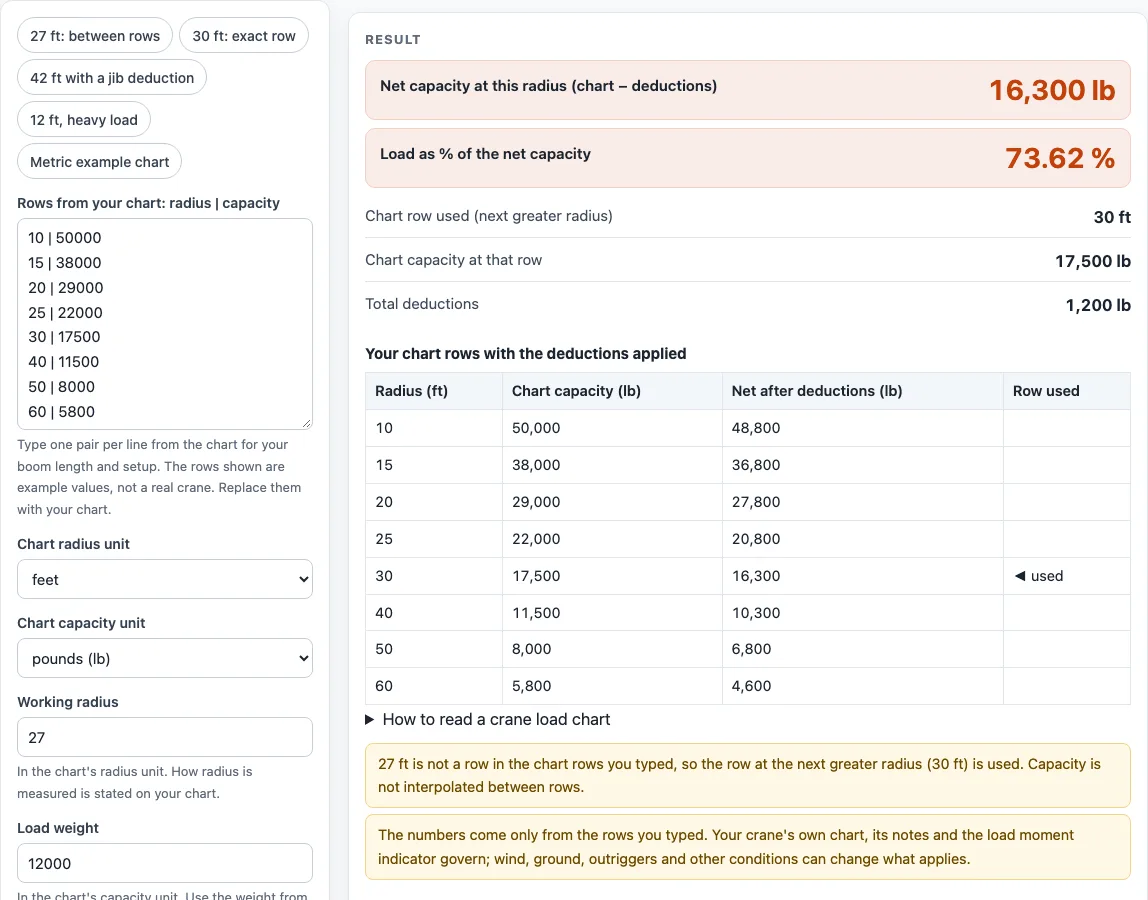
To try the page first, use a preset: “27 ft: between rows”, “30 ft: exact row”, “42 ft with a jib deduction”, “12 ft, heavy load”, or “Metric example chart”.
What does the next greater radius rule mean on a crane load chart?
The page uses the first typed row whose radius is greater than or equal to your working radius. It never interpolates between rows, and a radius below the first row uses the first row. The rule is not in 29 CFR 1926.1417. It comes from chart notes and from a US Navy load-moment test procedure, and those sources say to use the next longer radius.
For example, a working radius of 27 ft falls between the 25 ft and 30 ft rows on the example chart, so the 30 ft row is used. A working radius beyond the last typed row is an error, because no capacity is listed there and the page does not extrapolate. Some charts have exceptions, and one chart reportedly lists a higher capacity at a longer boom length. The page does not apply any boom-length rule, so check the notes on your own chart.
Some study guides say to round the radius up and read the lower capacity. The page does not take the minimum over all later rows. It reads the next greater row, and it shows a warning when capacity rises from one row to the next. Your chart notes decide whether that is the right reading for your crane.
How is net capacity and load percent worked out?
Net capacity equals the chart capacity at the row used, minus every deduction you type. The deductions are the hook block or ball, rigging and slings, jib or extension, and other items on the hook. A crane service guide says to always make deductions for jibs, blocks and rigging, and never to use gross capacity as net capacity. The page does not know how much to deduct, so take those figures from your chart notes.
The load percent is the load divided by the net capacity, multiplied by 100. In the default example, the 30 ft row gives 17,500 lb, deductions total 1,200 lb, and the net capacity is 16,300 lb. A 12,000 lb load is 73.62 percent of that net capacity. If the load is larger than the net capacity, the page says so and shows both numbers. If the deductions equal or exceed the chart capacity, no percent is shown. These figures are arithmetic on your inputs, not a decision about the lift. Your crane’s chart, its notes and its load moment indicator govern.
Sources (checked 15 October 2026): ecfr.gov · ncc.navfac.navy.mil · scribd.com · barnhartcrane.com · ecfr.gov
Worked examples
| Input | Result |
|---|---|
| radius 27 ft, load 12000 lb | row 30 ft: chart 17,500 lb, net 16,300 lb |
| radius 30 ft, load 12000 lb | row 30 ft: chart 17,500 lb, net 16,300 lb |
| radius 42 ft, load 6000 lb | row 50 ft: chart 8,000 lb, net 5,300 lb |
| radius 12 ft, load 30000 lb | row 15 ft: chart 38,000 lb, net 36,000 lb |
| radius 7.5 m, load 4000 kg | row 9 m: chart 5,500 kg, net 5,200 kg |
Calculated by the tool above; open it with the same values to see each step.
Frequently asked questions
Are the values on this page from a real crane?
No. The example rows and values are labelled as examples and do not describe a real crane. The page holds no crane capacities, so you need to type the rows from your own chart.
Does the page decide whether a lift can go ahead?
No. The page calculates a net capacity and a load percent from the numbers you type. It does not decide whether a lift may go ahead. Your crane’s chart, its notes, its load moment indicator and the rules that apply to your work decide.
Where does the next greater radius rule come from?
It comes from chart notes and a US Navy load-moment test procedure. It is not stated in 29 CFR 1926.1417. Check the notes on your own chart, because some charts have exceptions.
Why does the page show a warning about capacity rising?
Capacity usually falls as radius grows, so a rise from one row to the next often means a typing error. The warning is a check for you to review. Compare the row with your chart.
What happens if my working radius is beyond the last row?
The page shows an error. No capacity is listed beyond the last typed row, and the page does not extrapolate. Look at your chart to see whether a longer radius is listed.
Can I use metric units?
Yes. Choose metres for radius and kg or tonnes for capacity, then type your radius, load and deductions in the same units. The metric example chart is available as a preset.
Related tools
Crane Signal Chart - use it when you need to check hand signals for crane operations.
Forklift Capacity Calculator - use it when you want to work through a capacity calculation for a forklift.
Sling Angle Calculator - use it when you need to see how sling angle affects the load on slings.
Lifting and Rigging - the hub for the sling, forklift and crane tools on this site.
Crane Inspection Checklist - use it when you want a printable crane and sling inspection sheet to fill in.
Equipment Inspection Checklist - use it when you want a printable equipment inspection sheet to fill in.
Hydraulic Cylinder Force Calculator - use it when you want push and pull force of a cylinder from your own numbers.