Equipment Depreciation Calculator
Enter the cost, salvage value and useful life, pick a method, and get the depreciation, accumulated depreciation and book value for every year.
Recent
Your last 10 settings, saved only in this browser. Nothing is uploaded.
How to use the Equipment Depreciation Calculator
- Open the “Method” control. It starts on straight-line. Choose declining balance, sum-of-the-years’-digits or units of production if that matches your records.
- Enter the “Cost of the equipment”. The default is 58,000.
- Enter the “Salvage value”, the amount you expect the equipment to be worth at the end of its useful life. The default is 10,000.
- Enter the “Useful life (whole years)”. The default is 5.
- For declining balance only, set the “Declining-balance factor” to 2 or 1.5.
- For declining balance only, turn on “Switch to straight-line when it gives more” if you want that rule applied.
- For units of production only, enter “Total units expected over its life” and “Units used each year (one number per line)”.
- If the equipment was not in service for the full first year, open “More options” and set “Months in service in the first year”. The default is 12.
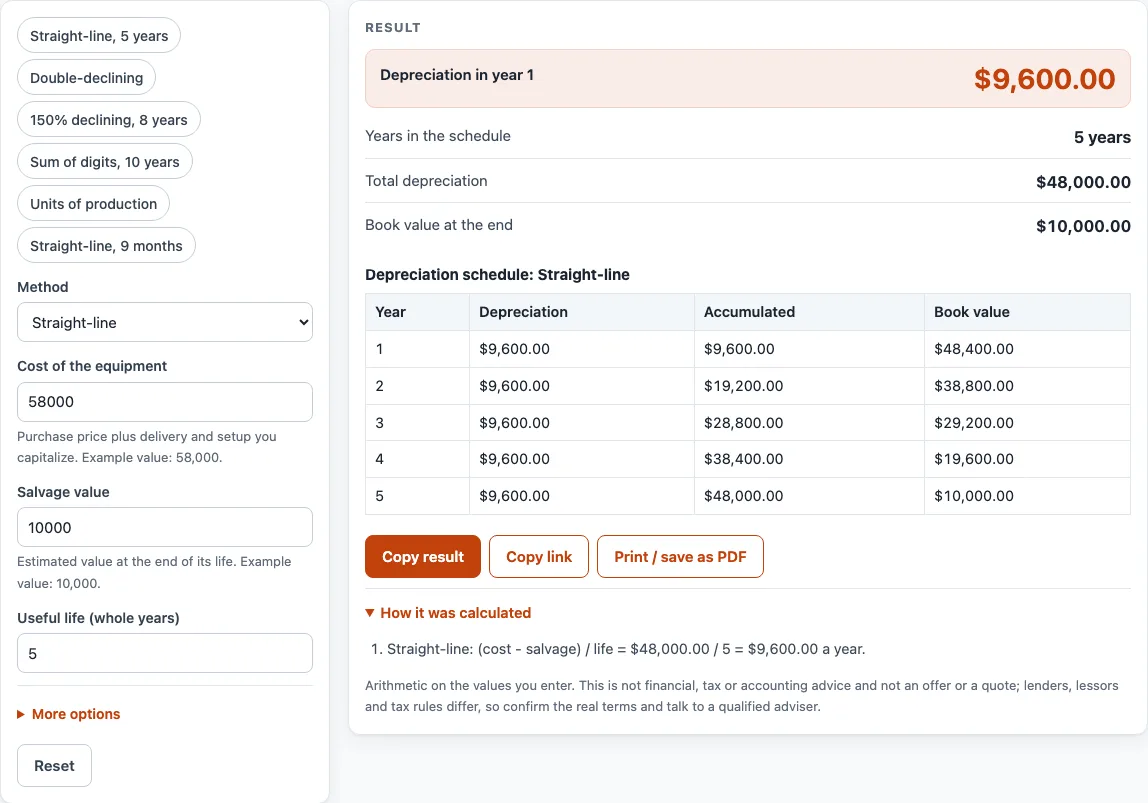
- Read the schedule table: year, depreciation, accumulated depreciation and book value. Check any warnings. A warning appears when declining balance without the switch ends above salvage, and when units entered differ from the total expected.
Presets are available for straight-line over 5 years, double-declining, 150% declining over 8 years (40,000 cost, 4,000 salvage), sum of digits over 10 years, units of production, and straight-line over 9 months. Load one as a starting point, then change any value to see your own schedule.
What does straight-line depreciation mean and how is it calculated?
Straight-line depreciation spreads the cost minus salvage value evenly across the useful life. The formula is (cost - salvage) / life. With the default inputs, the calculator gives 9,600 a year for 5 years, and book value falls 48,400, 38,800, 29,200, 19,600 and then 10,000.
How does declining balance depreciation work?
Declining balance applies a rate to the book value at the start of each year. The rate is the factor divided by the useful life, so a factor of 2 on a 5-year life gives 40% a year. With the default factor of 2, the yearly amounts are 23,200, 13,920, 8,352, 2,528 and 0. The calculator ignores salvage in the first calculation, and book value never goes below salvage.
A 150% declining balance uses a factor of 1.5. On 10,000 over 5 years with no salvage, the rate is 30%, giving 3,000, 2,100, 1,470, 1,029 and 720.30. The 150% factor and the switch rule are cited to the methods table in IRS Publication 946. OpenStax gives no 150% example.
The switch option takes the larger of the declining-balance amount and (book value - salvage) / remaining years each year. Pub 946 says declining balance changes to straight-line when that method gives an equal or greater deduction. In the example of 10,000 cost, 0 salvage, 5 years and factor 2, the switch gives 4,000, 2,400, 1,440, 1,080 and 1,080. Without the switch, the amounts are 4,000, 2,400, 1,440, 864 and 518.40, and the book value ends at 777.60, which triggers a warning.
How are sum-of-the-years’-digits and units of production calculated?
Sum-of-the-years’-digits (SYD) uses year k = (cost - salvage) x (life - k + 1) / (n(n+1)/2), where n is the life. For 115,000 cost, 5,000 salvage and 10 years, the amounts run 20,000, 18,000, 16,000 and so on down to 2,000. OpenStax gives no worked SYD figures, so this example comes from AccountingCoach.
Units of production divides (cost - salvage) by total units, then multiplies by the units used that year. For 960,000 pages and 0.05 a page, usage of 180,000, 200,000, 210,000, 190,000 and 180,000 gives 9,000, 10,000, 10,500, 9,500 and 9,000.
How does a partial first year change the schedule?
Enter fewer than 12 months in “Months in service in the first year”. The calculator splits each year of the asset’s life into m/12 and (12-m)/12 across two accounting years, so the schedule has one extra year. For straight-line with 9 months, the amounts are 7,200, then 9,600 for four years, then 2,400. OpenStax has this example. Neither source covers partial years for declining balance or SYD, so the layering approach used here is this page’s own assumption.
Sources (checked 15 October 2026): openstax.org · accountingcoach.com · irs.gov · irs.gov
Worked examples
| Input | Result |
|---|---|
| Straight-line, cost $58,000.00, salvage $10,000.00 | year 1 $9,600.00, 5 years |
| Declining balance, cost $58,000.00, salvage $10,000.00 | year 1 $23,200.00, 5 years |
| Declining balance, cost $58,000.00, salvage $10,000.00 | year 1 $17,400.00, 5 years |
| Sum-of-the-years'-digits, cost $115,000.00, salvage $5,000.00 | year 1 $20,000.00, 10 years |
| Units of production, cost $58,000.00, salvage $10,000.00 | year 1 $9,000.00, 5 years |
| Straight-line, cost $58,000.00, salvage $10,000.00 | year 1 $7,200.00, 6 years |
Calculated by the tool above; open it with the same values to see each step.
Frequently asked questions
Is this a tax depreciation calculator?
No. It calculates book (accounting) depreciation. Tax depreciation under MACRS has its own pages, linked below.
Which depreciation method should I use?
The calculator does not choose a method for you. Pick the one that matches how your records are kept, then compare the schedule it produces.
Why can declining balance book value stop above salvage?
When the switch is off, the schedule can end above salvage value, and a warning appears. With the switch on, the calculator takes the larger of the declining-balance amount and the straight-line amount each year.
Can I use this for equipment that was in service for part of the first year?
Yes. Set “Months in service in the first year” under “More options”. The schedule then adds one extra year, as described above.
Does the calculator upload my numbers?
No. Everything runs in your browser. Nothing is uploaded, and no sign-up is needed.
Why might two sources show different figures for the same method?
Sources do not always give the same examples. OpenStax has no worked SYD figures, and neither source gives a 150% declining-balance example. This page says which source each figure comes from.
Does this page give tax or accounting advice?
No. It is book depreciation arithmetic on the numbers you type. Tax rules differ, so check the current IRS publication and talk to a tax adviser for tax depreciation.
Related tools
- Equipment Lease Calculator: use it to work out lease payments from the numbers you enter.
- Equipment Loan Calculator: use it to work out loan payments for equipment purchases.
- Heavy Equipment Loan Calculator: use it when the equipment you are financing is heavy equipment.
- MACRS Depreciation Calculator: use it for tax depreciation under MACRS rather than book depreciation.
- MACRS Depreciation Table: use it to look up MACRS depreciation tables.
- Semi Truck Loan Calculator: use it to work out loan payments for a semi truck.
- Tractor Loan Calculator: use it to work out loan payments for a tractor.
- Trailer Loan Calculator: use it to work out loan payments for a trailer.