Equipment Inspection Checklist
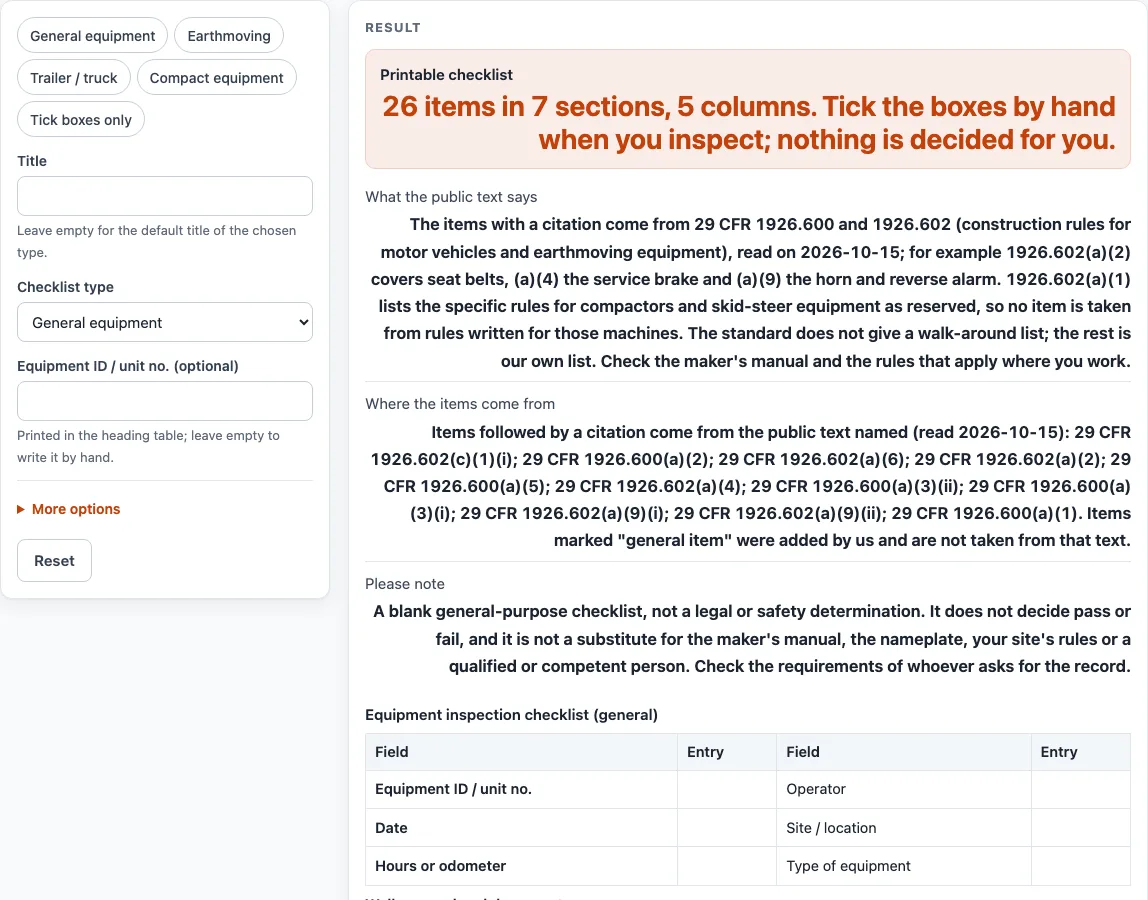
Choose general, earthmoving, trailer/truck or compact equipment and print a blank walk-around checklist with pass, fail and N/A boxes, a defect log and a sign-off block.
Recent
Your last 10 settings, saved only in this browser. Nothing is uploaded.
How to use the Equipment inspection checklist
- Choose a “Checklist type”: “General equipment”, “Earthmoving”, “Trailer / truck” or “Compact equipment”. Each type has its own heading and item count: 26, 29, 22 and 27 items. For heavy equipment, pick “Earthmoving”.
- Leave “Title” empty to print the default title for your chosen type, or type your own.
- Enter an “Equipment ID / unit no. (optional)”, or leave it empty to write the number by hand.
- Under More options, keep or switch off “Notes column” and “Show the source after each item”.
- Under More options, choose whether to “Add a defect log”. Set “Defect log rows” from 0 to 12 (default 4).
- Under More options, choose whether to “Add a sign-off block”. Set “Blank write-in rows” from 0 to 20 (default 2) for items of your own.
- Check the “Printable checklist” output before you print.
- Print it with Print / save as PDF, or select “Download as CSV (opens in Excel)” to save equipment-inspection-checklist.csv.
- On the printed sheet, work through each item and tick Pass, Fail or N/A by hand. Record any defects in the defect log.
Print the sheet for each inspection so that every record is on paper. Use the CSV download if you want to edit the tables in a spreadsheet program. The tool keeps no record of your entries, so save or print your sheet before you close the page.
What does an equipment inspection checklist actually record?
An equipment inspection checklist records what the person inspecting finds on each item. Each row has Pass, Fail and N/A boxes, plus a Notes column that you can switch on or off. The form does not judge the machine; it gives you a place to write down the result.
Where do the items on this checklist come from?
Items with a citation come from 29 CFR 1926.600 and 1926.602, which are construction rules for motor vehicles and earthmoving equipment. The sheet’s text says these rules were read on 2026-10-15. For example, 1926.602(a)(2) covers seat belts, 1926.602(a)(4) covers the service brake, and 1926.602(a)(9) covers the horn and reverse alarm. These rules do not give a walk-around list, so the rest of the items are our own design, marked “general item”. Of the 26 items on the default sheet, 15 are general items and 11 carry a citation.
The rules for compactors and skid-steer equipment are listed as reserved in 1926.602(a)(1). No separate OSHA text was read for compactors or skid-steer equipment. Keep “Show the source after each item” on to see which source applies to each row.
Why do the four checklist types have different item counts?
Each type includes a different set of items. General equipment has 26, earthmoving has 28, trailer or truck has 22, and compact equipment has 27. The counts describe the list, not how well a machine performs. The sections are the same seven in every type, so you can compare sheets section by section.
How should the defect log and sign-off block be used?
The defect log, titled “Defects found and removed from service”, has columns for the defect, its location, who it was reported to, whether the equipment was removed from service, and the date corrected. Use one row per defect. The sign-off table asks for the name, signature, date and time of the person who inspected, and the name of the reviewer.
A blank form only holds what you write on it. Check the requirements of whoever asks for the record, because they may need more than this sheet provides.
What does this checklist not replace?
The checklist does not replace the maker’s manual, the nameplate, your site’s rules, or a qualified or competent person. Where sources differ, the maker’s manual and the rules that apply where you work should guide your decisions.
Sources (checked 15 October 2026): law.cornell.edu · law.cornell.edu
Worked examples
| Input | Result |
|---|---|
| Checklist type: General equipment | 26 items in 7 sections, 5 columns |
| Checklist type: Earthmoving | 28 items in 7 sections, 5 columns |
| Checklist type: Trailer / truck | 22 items in 7 sections, 5 columns |
| Checklist type: Compact equipment | 27 items in 7 sections, 5 columns |
| Checklist type: General equipment | 26 items in 7 sections, 5 columns |
Calculated by the tool above; open it with the same values to see each step.
Frequently asked questions
Is this equipment inspection checklist free to use?
Yes. It runs in your browser, needs no sign-up, and nothing you enter is stored or uploaded.
Can I see which items come from OSHA text and which do not?
Yes. Keep “Show the source after each item” on, which is the default. Items without OSHA text read for them are marked “general item”.
Does the tool tell me whether my equipment passes?
No. The tool does not decide pass or fail. You tick Pass, Fail or N/A for each item on the printed sheet.
Can I use it as a heavy equipment inspection checklist?
Yes. Choose “Earthmoving” as the “Checklist type”. The title then reads “Heavy equipment inspection checklist (earthmoving)”, with 28 items.
How can I save the checklist?
Use Print / save as PDF to print or save a PDF. Use “Download as CSV (opens in Excel)” to save the tables as equipment-inspection-checklist.csv.
What do the sources in brackets mean?
Each item ends with its source in brackets. It is either a “29 CFR” paragraph, such as 1926.602(a)(2), or “general item”, which means we added the item and no OSHA text was read for it.
Does this checklist replace the maker’s manual?
No. Results are not a substitute for the maker’s manual or the nameplate. Check both before inspecting the equipment. The sheet also does not replace your site’s rules or a qualified or competent person.
Related tools
- Crane Inspection Checklist: use this when your inspection covers a crane rather than a mobile machine.
- Forklift Inspection Checklist: use this for a pre-use check of a lift truck.
- Forklift Maintenance Checklist: use this to plan and record upkeep tasks for a forklift.
- Machine Guarding Checklist: use this to check guards on fixed machines in your workplace.
- Equipment Inspection Checklists: use this to see every inspection checklist on this site.
- Maintenance Work Order Template: use this to print a work order for a defect found on an inspection.