Forklift Maintenance Checklist
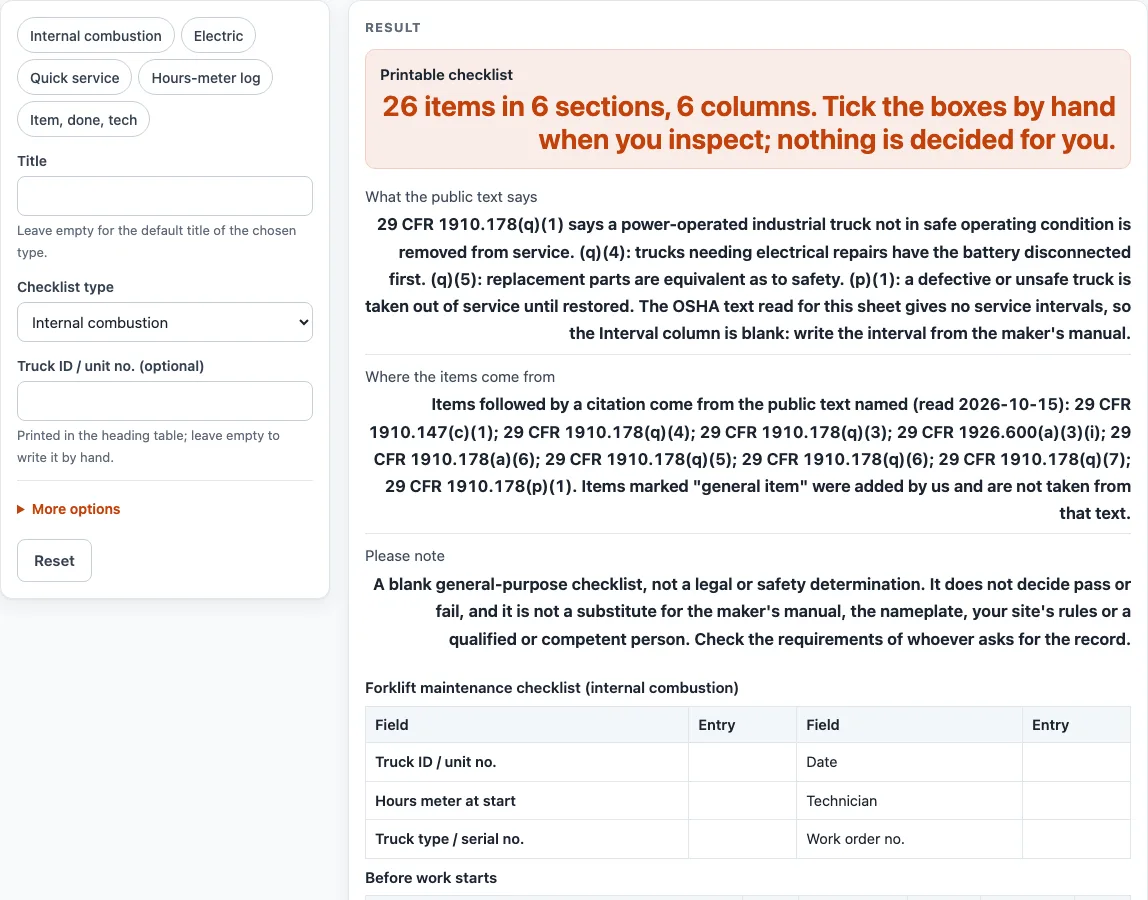
Pick the truck type, then print a blank forklift maintenance checklist with done boxes and blank interval, hours-meter, technician and date columns.
Recent
Your last 10 settings, saved only in this browser. Nothing is uploaded.
How to use the Forklift Maintenance Checklist
- Enter a name in “Title”, or leave it empty to print the default title of the checklist type you choose.
- Pick a “Checklist type”: “Internal combustion” (the default), “Electric” or “Quick service”.
- Enter a “Truck ID / unit no. (optional)”, or leave it empty to write the ID by hand.
- Open More options. Keep or untick the “Done column”, “Interval column”, “Hours meter column”, “Technician column” and “Date column” (all on by default). Turn on the “Notes column” if you need it (off by default).
- Decide whether to keep “Show the source after each item” (on by default). It adds the OSHA paragraph, or “general item”, after each item.
- Switch on “Add a defect log” (off by default) if you want a table for defects found, then set “Defect log rows” from 0 to 12 (default 3).
- Keep “Add a sign-off block” on (the default) for a technician and reviewer sign-off table.
- Set “Blank write-in rows” from 0 to 20 (default 3) for items of your own.
- Check the preview, then choose Print / save as PDF, or download the tables with “Download as CSV (opens in Excel)”.
Printed Done cells appear as empty boxes to tick by hand. The CSV file is saved as forklift-maintenance-checklist.csv. The presets “Internal combustion”, “Electric”, “Quick service”, “Hours-meter log” and “Item, done, tech” set several of these controls at once.
What is a forklift maintenance checklist for?
A forklift maintenance checklist is a record of the checks someone makes on a truck, with space to write what they found. This sheet is a blank form, so it does not judge the truck. The internal combustion type has 26 items in 6 sections, the electric type has 27 items in 7 sections, and the quick service type has 14 items in 6 sections.
The default internal combustion sheet groups its items under “Before work starts”, “Fluids and filters”, “Mast, chains, forks and hydraulics”, “Tires, brakes and steering”, “Condition of the truck” and “Return to service”.
Where do the items on this checklist come from?
Items that are based on OSHA text end with their source in brackets, such as “29 CFR 1910.178(q)(4)”. Items marked “general item” were added by us and were not taken from OSHA text. Across the three checklist types there are 21 general items (16 on the default sheet), such as “Engine oil and filter”, “Coolant level and hoses”, “Air filter and fuel filter” and “Transmission fluid level”. The layout, section order and general items are our own design.
What does the OSHA text say about removing a truck from service?
The public text says a power-operated industrial truck that is not in safe operating condition is removed from service (29 CFR 1910.178(q)(1)). Paragraph (p)(1) says a defective or unsafe truck stays out of service until it is restored. Paragraph (q)(5) says replacement parts must be equivalent to the originals as to safety. These are what the named source says. They are not a finding about your truck.
Why is the Interval column blank?
The OSHA text read for this sheet gives no service intervals, so the “Interval (hours / months)” column is left blank. Write the interval from the maker’s manual, since the manual is the source for that information. If you do not need the column, untick “Interval column” under More options.
Who decides whether a forklift passes?
The tool does not decide pass or fail. Blank checklists record what you find, and the sheet itself makes no judgement. Defects go in the optional defect log (switch on “Add a defect log”), which asks where on the equipment the defect is, who it was reported to, whether the truck was removed from service ("☐ Yes ☐ No"), and the date it was corrected. The page note says results are not a substitute for the maker’s manual, the nameplate or a qualified person. Check what the person or body asking for the record requires.
Sources (checked 15 October 2026): law.cornell.edu · law.cornell.edu · law.cornell.edu
Worked examples
| Input | Result |
|---|---|
| Checklist type: Internal combustion | 26 items in 6 sections, 6 columns |
| Checklist type: Electric | 27 items in 7 sections, 6 columns |
| Checklist type: Quick service | 14 items in 6 sections, 6 columns |
| Checklist type: Internal combustion | 26 items in 6 sections, 6 columns |
Calculated by the tool above; open it with the same values to see each step.
Frequently asked questions
Is there a free forklift maintenance checklist I can print?
Yes. The tool is free, runs in your browser, and needs no sign-up. Use Print / save as PDF to print the sheet or keep a copy as a PDF.
Can I download the forklift maintenance checklist as a spreadsheet?
Yes. Select “Download as CSV (opens in Excel)” to save the tables as forklift-maintenance-checklist.csv.
Does this checklist say whether a forklift passes inspection?
No. It is a blank form that records what you find. Nothing is judged or stored by the tool.
What is the difference between the checklist types?
The internal combustion type has 26 items in 6 sections. The electric type has 27 items in 7 sections, including a battery and electrical section. The quick service type has 14 items in 6 sections. The “Quick service” preset also switches the interval column off.
How often should a forklift be serviced?
The OSHA text read for this sheet gives no service intervals. Write the interval from the maker’s manual in the “Interval (hours / months)” column.
Where is my checklist saved after I make it?
The tool does not store or upload anything. Keep the printed sheet or the CSV file yourself, because nothing is kept when you leave the page.
Related tools
- Crane Inspection Checklist: Use this when your inspection covers cranes rather than forklifts.
- Equipment Inspection Checklist: Use this for a general inspection record across different types of equipment.
- Forklift Inspection Checklist: Use this when you want a forklift inspection sheet rather than a maintenance one.
- Machine Guarding Checklist: Use this to record checks on guards and protective parts of machines.
- Equipment Inspection Checklists: Use this to see every inspection checklist on this site.
- Forklift Capacity Calculator: Use this to estimate capacity at another load center from values you type from the data plate.