HVAC Preventive Maintenance Checklist
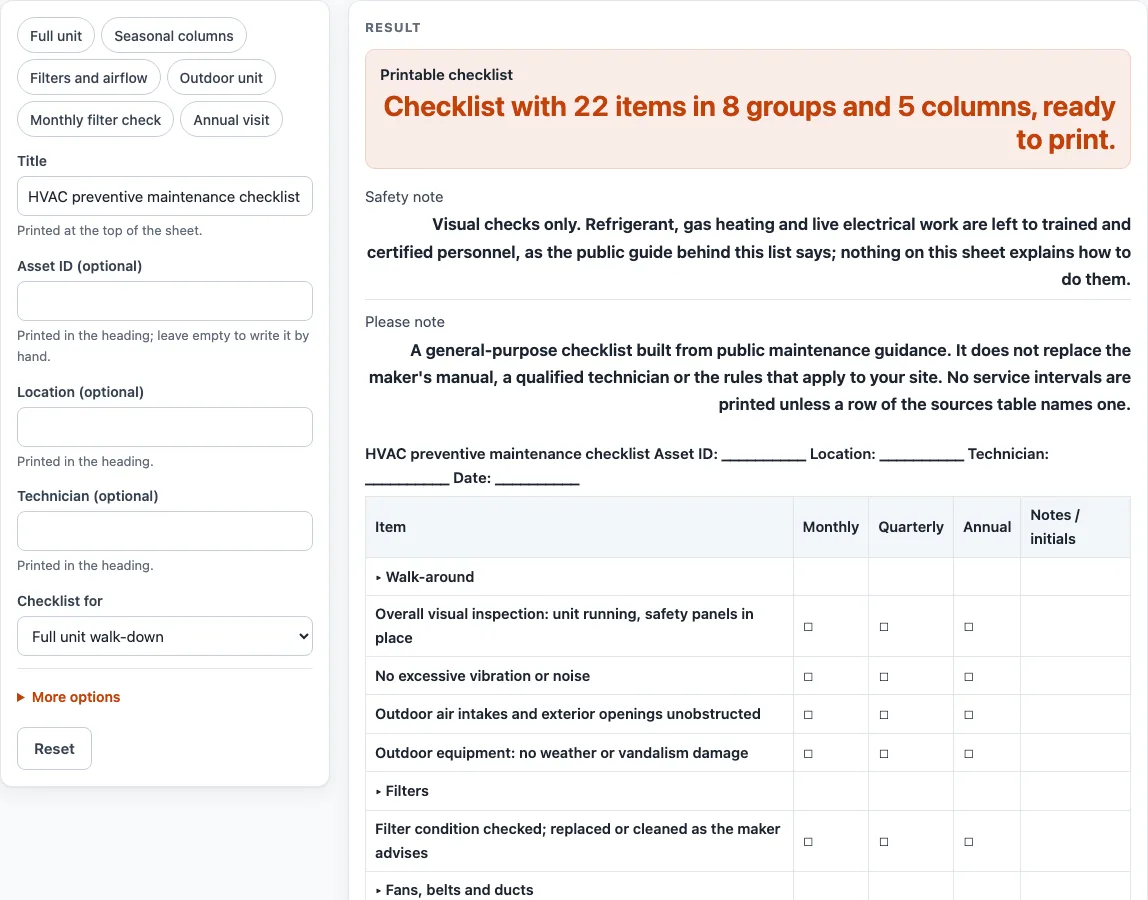
Choose a full unit walk-down, filters and airflow, or outdoor unit and roof, pick period or seasonal columns, then print the checklist or download it as CSV. Visual checks only.
Recent
Your last 10 settings, saved only in this browser. Nothing is uploaded.
The hvac preventive maintenance checklist on this page is a blank, printable check-off list for heating, ventilation and air conditioning units.It has grouped items with tick boxes, and you customise it in your browser before you print it or save it as a PDF or download it as a CSV file that opens in Excel. Nothing you type is stored or uploaded.
Three scopes cover different jobs: a full unit walk-down, filters and airflow, and the outdoor unit and roof.You can add a title, asset ID, location and technician name to the heading, or leave them blank to write by hand. The sheet is built from public maintenance guidance, and a table below it shows what that guidance says about timing. The sheet records what you find. It does not decide whether a unit is ready for use.
How to use the hvac preventive maintenance checklist
- Type a heading in “Title”. The default is “HVAC preventive maintenance checklist”, and it prints at the top of the sheet.
- Fill in “Asset ID (optional)”, “Location (optional)” and “Technician (optional)” if you want them printed in the heading.Leave them empty to write them by hand.
- Pick a scope in “Checklist for”: “Full unit walk-down”, “Filters and airflow” or “Outdoor unit and roof”.
- Under More options set “Blank write-in rows” from 0 to 20. The default is 3, and those extra rows go at the end under “Other (write in)”.
- Switch on the tick-box columns you need under More options: “Daily column”, “Weekly column”, “Monthly column”, “Quarterly column”, “Annual column”, or the seasonal columns “Spring column”, “Summer column”, “Fall column” and “Winter column”. Monthly, Quarterly and Annual start on.
- Leave “Notes / initials column” on for a space for notes and initials.
- Leave “Add the table of what public sources say” on to print the timing table, or switch it off.
- Read any warning. If no column is on, each item gets a single Done box. If more than 9 columns are on, the columns print narrow.
- Use “Print / save as PDF” to print the sheet, or “Download as CSV (opens in Excel)” to save all tables as hvac-preventive-maintenance-checklist.csv.
Presets such as “Full unit”, “Filters and airflow”, “Outdoor unit”, “Monthly filter check” and “Annual visit” set the columns and scope for you. Change any control afterwards to adjust it.
What does an HVAC preventive maintenance checklist record?
The checklist records what you observe and do on a visit. Each tick box shows that you checked an item, and the notes column holds what you found. It does not measure the unit or judge its condition, so an empty box means only that nothing was marked. Items are grouped under headings such as Walk-around, Filters, Coils and condensate, Controls and Records. The heading fields, Asset ID, Location, Technician and Date, show which unit and visit the sheet belongs to.
The last group, Records, asks you to log the date, the work done and any parts replaced. The source behind that item says to document maintenance in a logbook, so the printed sheet can serve as one entry.
Why do the timing columns differ between sources?
The timing table in this tool comes from one named source: the PNNL / DOE FEMP unitary HVAC best practice table. That table places some items at daily or weekly visits, some at quarterly visits and some at annual visits. Other public commercial HVAC checklists suggest different intervals, such as monthly filter checks. Because the sources differ, this sheet does not print a service interval on any row.
The Monthly, Quarterly and Annual columns are labels only. You tick them when the maker’s manual or your own plan says a task is due. The sources table gives the maker’s manual first place, and the same rule applies to every column on the sheet.
Which HVAC checks on this sheet are visual only?
Most items are visual checks: you look, listen and note what you see. Wiring and connections are marked “visual only” because the sheet asks you to look at them, not test or adjust them. The PNNL table says electrical connections should be tight at annual visits, but this sheet does not ask you to tighten or test anything.
The source also says that refrigerant must be handled according to regulations, that gas must be shut off before work on gas heating, and that these actions should be attempted only by trained and certified personnel. The “Safety note” printed with the sheet repeats that refrigerant, gas heating and live electrical work are left to trained and certified personnel.
Sources (checked 15 October 2026): pnnl.gov
Worked examples
| Input | Result |
|---|---|
| 5 columns | 22 item rows, 5 columns |
| 6 columns | 22 item rows, 6 columns |
| 7 columns | 12 item rows, 7 columns |
| 3 columns | 9 item rows, 3 columns |
| 4 columns | 22 item rows, 4 columns |
Calculated by the tool above; open it with the same values to see each step.
Frequently asked questions
How often should HVAC preventive maintenance be done?
This checklist does not print a service interval. The PNNL / DOE FEMP table places items at daily, weekly, quarterly and annual visits, but other public sources differ. Use the maker’s manual or your own plan to decide how often to tick each column.
Is this checklist enough to keep an HVAC unit safe?
No. The “Please note” printed with the sheet says it does not replace the maker’s manual, a qualified technician or the rules that apply to your site. It is a record form, not a safety assessment.
Can I use this checklist for a rooftop unit?
Yes, if the unit is outdoors on a roof. Choose “Outdoor unit and roof” in “Checklist for”. That scope includes the roof and wall penetrations item and the coils, condensate and electrical visual checks.
Why does the sheet show Monthly, Quarterly and Annual columns by default?
Those three columns are switched on by default so you have tick boxes ready to use. Switch off any column you do not need under More options. Fewer columns print wider and easier to read.
Can I add my own items to the checklist?
You can add blank write-in rows. Set “Blank write-in rows” under More options from 0 to 20. If you type a larger number, the sheet uses 20 and shows a warning.
Does the tool keep a copy of my checklist?
No. Nothing is stored or uploaded. Save your work by printing to PDF or downloading the CSV file.
Related tools
- Preventive Maintenance Checklist: use it when you need a general checklist for equipment that is not an HVAC unit.
- Preventive Maintenance Schedule: use it when you want to plan the dates of your maintenance visits.
- Generator Maintenance Checklist: use it for a check-off list for a standby or portable generator.
- Preventive Maintenance Checklists: use it to see every maintenance check-off list on this site.
- Maintenance Work Order Template: use it to print a work order for a repair found on a visit.
- Air Compressor Maintenance Checklist: use it for a check-off list for an air compressor.