HVAC Work Order Template
Pick the sections for an HVAC service or repair call, then print the blank form or download it as a CSV. Nothing is calculated.
Recent
Your last 10 settings, saved only in this browser. Nothing is uploaded.
Use this hvac work order template to make a blank, printable work order form for heating, ventilation and air conditioning jobs. It runs in your browser, is free, and needs no sign-up. You build the form from the options you pick, then print it and write on it by hand.
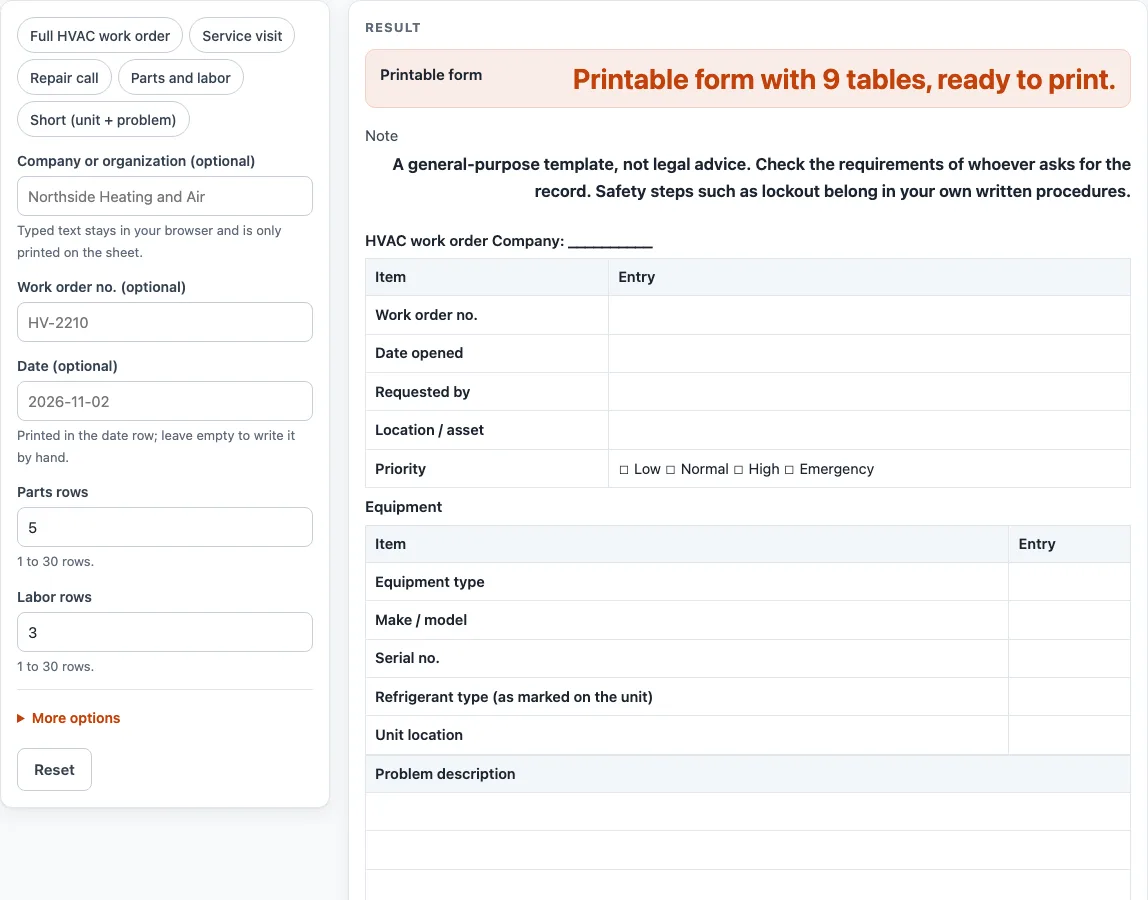
The default sheet has a header with work order number, dates, requester, location and priority. It also includes an equipment block, a problem description, a checks table, a service performed area, parts and labor tables, and completion lines with signatures. You can switch sections on or off, then print the sheet or download it as a CSV that opens in Excel. Nothing is calculated, stored or uploaded.
How to use the HVAC Work Order Template
- Pick a preset such as “Service visit”, “Repair call” or “Full HVAC work order”, or start from the defaults.
- Open More options and switch sections on or off.
- Type into “Company or organization (optional)”, “Work order no. (optional)” and “Date (optional)” if you want them in the header. Leave them empty to get blank lines to write on.
- Set “Parts rows” and “Labor rows”. Each takes 1 to 30 rows. The defaults are 5 parts rows and 3 labor rows.
- Fill in “Equipment details”, copying the refrigerant type from the unit’s label into “Refrigerant type (as marked on the unit)”.
- Describe the issue in “Problem description”, which has 3 lines.
- Leave “Check lines” on to print the six fixed check lines, then mark “Done” and write “Notes” by hand on the printed sheet.
- Tick one box in the priority row: “☐ Low ☐ Normal ☐ High ☐ Emergency”.
- Complete “Service performed”, “Parts table”, “Labor table”, “Completion block” and “Signatures”.
- Check the output line, which reads “Printable form with {n} tables, ready to print.”
Press the Print button to print the sheet. To get a file, select “Download as CSV (opens in Excel)”, which is made in the browser. The page does not provide a Word file, so copy the printed sheet or open the CSV if you need to edit it elsewhere.
What goes on an HVAC work order template?
An HVAC work order template records one service job on one piece of equipment. It gives a fixed set of boxes for the facts someone needs later: the unit, the problem, what was checked, what was done, and the parts and time used. A blank form records what the user finds. It does not decide anything about the equipment.
Why does the refrigerant line ask for the label?
The refrigerant line is a blank for copying the refrigerant type from the unit’s label. It records what is marked on the unit, not a measurement of what is in it on a given day. The sheet gives no refrigerant handling, charging or recovery instructions, so those belong in your own written procedures.
How do the checks table and check lines work?
The checks table has six fixed lines: “Air filter”, “Coils (visual)”, “Blower”, “Condensate drain”, “Thermostat / controls” and “Electrical connections (visual)”. Each line is a label only, and the “Done” and “Notes” columns print blank. Nothing on the sheet says how to do a check or which result is acceptable, so mark “Done” and write what you observed under “Notes” and use your own procedure for the check itself.
How do the parts and labor rows add up?
The sheet does not calculate anything. Each parts row and labor row is a line you fill in by hand. The labor table has a Total hours row, which you complete yourself. Any costs, rates or totals are work you do outside the sheet.
Does a printed sheet show the job was done correctly?
No. A printed sheet only shows what was written on it, and the sheet decides nothing. The template is general-purpose and is not legal advice, so check what the person asking for the record needs. Safety steps such as lockout/tagout belong in your own written procedures. If you use lockout/tagout, the sheet has a line for “Lockout/tagout procedure (name or no.)” that you can complete by hand.
Why keep a written work order at all?
A written record gives the next person the same starting facts: which unit it is, what the problem was, what was checked, and what was done. A blank template helps you keep those facts in the same order each time.
Worked examples
| Input | Result |
|---|---|
| 8 sections switched on | 9 tables including the header |
| 8 sections switched on | 9 tables including the header |
| 4 sections switched on | 5 tables including the header |
| 7 sections switched on | 8 tables including the header |
Calculated by the tool above; open it with the same values to see each step.
Frequently asked questions
Is the HVAC work order template free to use?
Yes. It is free, runs in your browser, and needs no sign-up. Nothing you type is uploaded or stored.
Can I save the form as a Word file?
No. The page does not provide a Word file. Print the sheet, or select “Download as CSV (opens in Excel)” and open the CSV.
What does the priority row do?
It holds four tick boxes: “☐ Low ☐ Normal ☐ High ☐ Emergency”. Tick the one that matches how urgent the job is. The sheet does not set the priority for you.
Can I remove sections I do not need?
Yes. Open More options and switch sections on or off. You can also start from a shorter preset such as “Short (unit + problem)”.
How many parts and labor rows can I have?
Each table takes 1 to 30 rows, with defaults of 5 parts rows and 3 labor rows. Above 30, the sheet uses 30 and shows a warning. Entering 0 or text gives an error while that table is on.
Does the sheet tell me how to do the checks?
No. The check lines are labels only. Nothing on the sheet says how to perform a check or which result is acceptable, so use your own procedures.
Related tools
Construction Work Order Template: use it when the job is building work rather than equipment service.
Maintenance Request Form: use it to ask for maintenance before any work is scheduled.
Maintenance Work Order Template: use it for general upkeep jobs across a building or site.
Plumbing Work Order Template: use it for pipe, fixture and water jobs.
HVAC Preventive Maintenance Checklist: use it for routine HVAC upkeep rather than a single service call.
Preventive Maintenance Checklist: use it for recurring upkeep tasks across equipment.