Hydraulic Cylinder Force Calculator
Enter the bore, rod diameter and pressure to get the push force on extend and the pull force on retract; add flow and stroke for speed, oil volume and time.
Recent
Your last 10 settings, saved only in this browser. Nothing is uploaded.
How to use the Hydraulic Cylinder Force Calculator
- Type the bore diameter in “Bore diameter (D)”. Choose the length unit: in, mm or cm.
- Type the rod diameter in “Rod diameter (d)”. Enter 0 for a ram with no rod. The rod must be smaller than the bore.
- Type the pressure in “Pressure (P)”. Choose psi, bar or MPa.
- Optional: type the flow in “Flow to the cylinder (Q, optional)” in gpm or L/min to get speeds and times.
- Optional: type the length in “Stroke (optional)” to get oil per stroke and time.
- Open More options and set “Efficiency (%)” to a value above 0 and up to 100. It starts at 100 %. Use the figure from the maker’s data if you have one.
- Read “Push force, extend (cap end, P × bore area)” and “Pull force, retract (rod end, P × annulus area)”.
- Check “Bore area (cap end)” and “Annulus area (bore − rod)” to confirm the inputs were read as you meant.
- Compare the results with the cylinder’s rated pressure and the maker’s data before you use them. The page does not give a rating.
The preset chips “2 in bore, 1,000 psi”, “4 in bore, 2,500 psi”, “6 in bore, 3,000 psi”, “100 mm bore, 200 bar”, “Ram, no rod” and “Force only” fill in example inputs so you can see how the form behaves. Results can be copied, linked or printed from the page.
How is the push force of a hydraulic cylinder calculated?
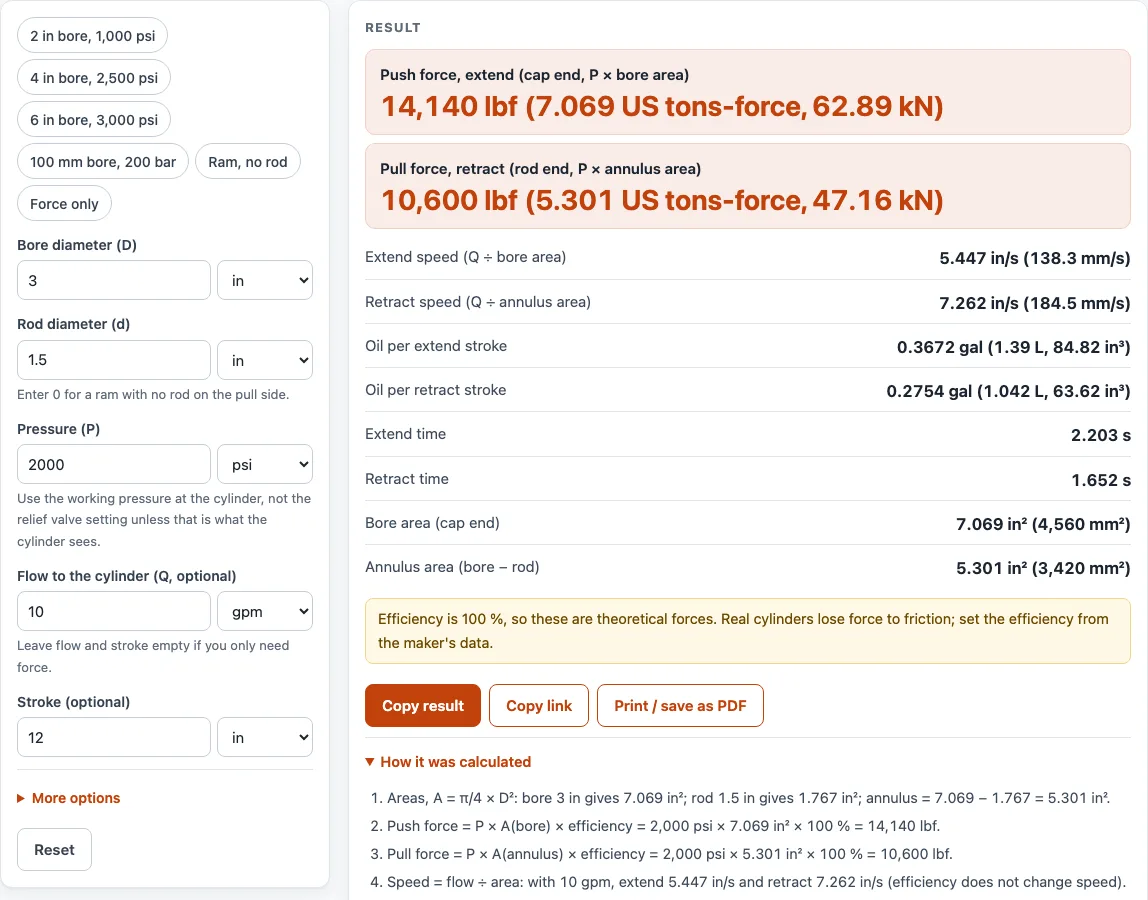
The push force on extend is the pressure multiplied by the bore area, which is the full circle at the cap end. The formula is F = P × π/4 × D². With the starting values of 3 in bore and 2,000 psi, the bore area is 7.069 in² and the push force is 14,137 lbf.
Why is the pull force smaller than the push force on a rod cylinder?
On retract, the oil acts only on the annulus, which is the bore area minus the rod area. The formula is F = P × π/4 × (D² − d²). With a 1.5 in rod, the annulus is 5.301 in² and the pull force is 10,603 lbf. A public textbook example with a 2 in bore, 1 in rod and 1,000 psi gives 3,142 lbf extending and 2,356 lbf retracting. With no rod (d = 0), the page shows no separate pull force.
How do flow, stroke and efficiency change speed, volume and force?
Speed is flow divided by the area that the oil fills. At 10 gpm, the extend speed is 5.447 in/s and the retract speed is 7.262 in/s. Oil per stroke is the area multiplied by the stroke length, so a 12 in extend stroke needs 0.3672 gal. Time is the volume divided by the flow, which gives 2.203 s to extend and 1.652 s to retract.
Efficiency changes force only. Speed and volume stay the same. In the metric example, a 100 mm bore with a 50 mm rod at 200 bar (20 MPa) and 90 % efficiency gives 141.4 kN push and 106.0 kN pull. The same bore at 40 L/min moves the rod at 84.88 mm/s.
Why are these results theoretical forces?
At 100 %, the calculation assumes no losses. Real cylinders lose some force to friction, so the efficiency should come from the maker’s data. The calculator does not include a loss figure of its own. It also does not give a working load limit, a relief setting or a rating. Each result is arithmetic on the numbers you type, so it is only as accurate as those numbers.
Sources (checked 15 October 2026): eng.libretexts.org · raydafonmachinery.com · calculate.co.nz · nist.gov
Worked examples
| Input | Result |
|---|---|
| Bore 3 in, rod 1.5 in, 2000 psi | Push 14,140 lbf, pull 10,600 lbf |
| Bore 2 in, rod 1 in, 1000 psi | Push 3,142 lbf, pull 2,356 lbf |
| Bore 100 mm, rod 50 mm, 200 bar | Push 31,780 lbf, pull 23,840 lbf |
| Bore 4 in, rod 2 in, 2500 psi | Push 28,270 lbf, pull 21,210 lbf |
Calculated by the tool above; open it with the same values to see each step.
Frequently asked questions
Does this calculator give the working load limit of my cylinder?
No. The page does not give a load limit, relief setting or rating. Compare the result with the cylinder’s rated pressure and the maker’s data.
Why is my real cylinder force lower than the result?
The page shows theoretical force at 100 % efficiency by default. Real cylinders lose force to friction. Enter the efficiency from the maker’s data under More options to see a lower figure.
Which units can I use?
Pressure can be entered in psi, bar or MPa. Lengths can be in, mm or cm. Flow can be in gpm or L/min. Forces are shown in lbf, US tons-force (2,000 lbf) and kN. Areas are shown in in² and mm².
What happens if the rod is as big as the bore?
The calculator raises an error when the rod diameter is equal to or larger than the bore diameter. The annulus area would be zero or negative, so the pull force cannot be worked out. Correct the rod or bore value to continue.
What inputs does the calculator reject?
It also raises errors for a value that is not a number, zero or negative pressure, zero or negative bore, a negative rod diameter, and an efficiency of 0 or over 100. Fix the value shown in the error to get a result.
Is my data sent anywhere?
No. Everything is calculated in your browser, and nothing is uploaded. There is no sign-up.
Related tools
- Hydraulic Hose Size Chart: use it when you are looking up hose sizes for the lines that feed the cylinder.
- Hydraulic Oil Viscosity Chart: use it when you are comparing oil grades for the system that drives the cylinder.
- JIC Fittings Chart: use it when you are checking the fitting sizes on the cylinder ports and lines.
- Hydraulics and Fittings: use it to see every hydraulic chart and calculator on the site in one place.
- Preventive Maintenance Checklist: use it when you want a printable checklist for routine machine upkeep.
- Equipment Inspection Checklist: use it when you want a printable form to record what you find on an inspection round.
- Preventive Maintenance Schedule Generator: use it when you want to turn service intervals into due dates to print.