Machine Guarding Checklist
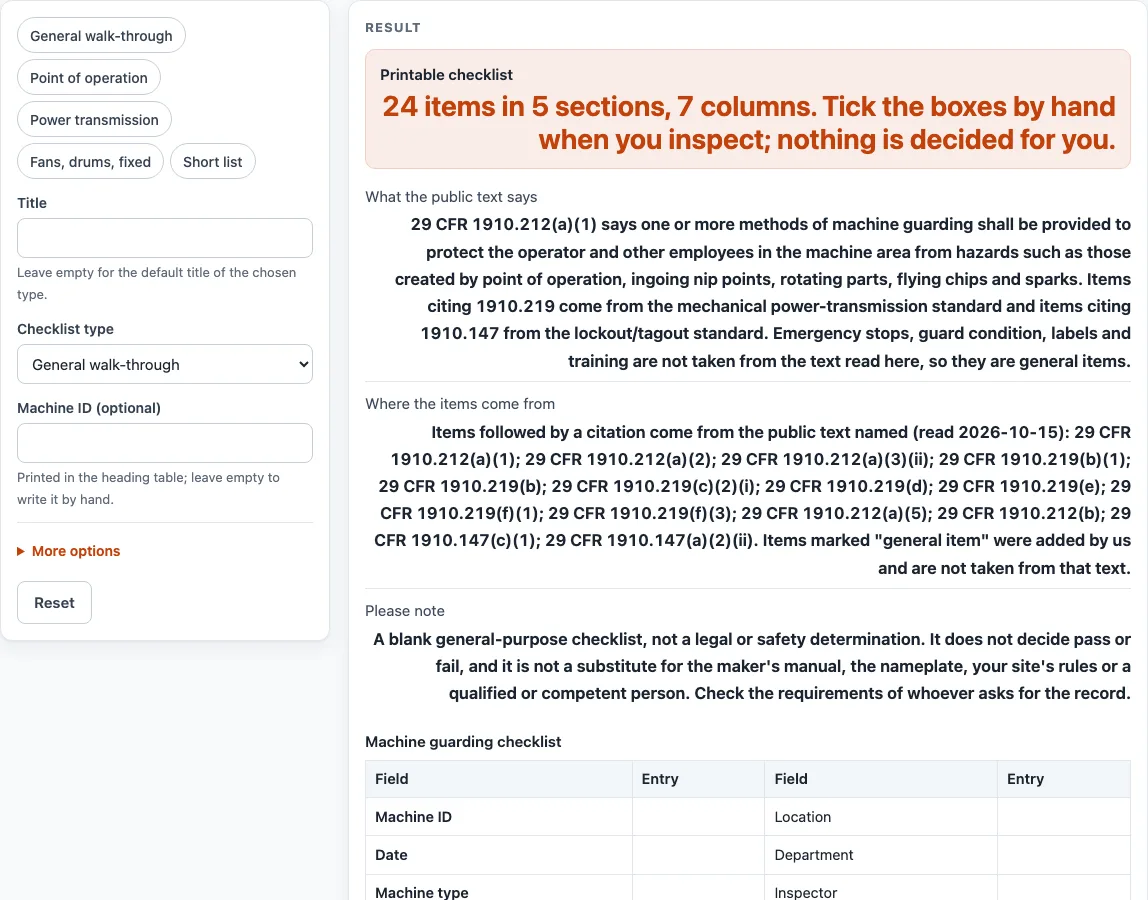
Choose what you are checking, add the machine ID and print a blank machine guarding checklist with pass, fail and N/A boxes plus finding, corrective action and date columns.
Recent
Your last 10 settings, saved only in this browser. Nothing is uploaded.
How to use the Machine guarding checklist
- Open “Checklist type” and pick one of five types: “General walk-through” (the default, 24 items), “Point of operation” (15 items), “Power transmission” (19 items), “Fans, drums, fixed machines” (10 items) or “Short list” (10 items).
- Leave “Title” empty to print the default title for your type, or type your own.
- Enter a “Machine ID (optional)”, or leave it empty to write it by hand.
- Under More options, turn “Finding column”, “Corrective action column” and “Date column” on or off.
- Keep “Show the source after each item” on to print the OSHA paragraph or “general item” after each item.
- Under More options, set “Add a defect log” and “Defect log rows” (0 to 12, default 3).
- Set “Add a sign-off block” and “Blank write-in rows” (0 to 20, default 2).
- Choose “Print / save as PDF”, or select “Download as CSV (opens in Excel)” to save machine-guarding-checklist.csv.
- Inspect the machine with the sheet, tick Pass, Fail or N/A by hand, and write findings and corrective actions in the blank columns.
The “Short list” preset selects the short list type and switches off the finding and date columns, the defect log and the write-in rows, leaving Item, Pass, Fail, N/A and Corrective action. The sheet only records what you find, so keep the safety note on this page in mind: it is not a substitute for the maker’s manual, the nameplate or a qualified person.
What does 29 CFR 1910.212 require for machine guarding?
The general rule in 29 CFR 1910.212(a)(1) is that one or more methods of machine guarding shall be provided to protect the operator and other employees in the machine area from hazards such as those created by point of operation, ingoing nip points, rotating parts, flying chips and sparks. Other items cite 1910.212(a)(2) for guards that are affixed to the machine where possible and are not a hazard themselves, and 1910.212(a)(3)(ii) for keeping the operator’s body out of the danger zone during the operating cycle.
Which rules sit behind the power transmission and fans items?
Items citing 1910.219 come from the mechanical power-transmission standard. They cover flywheels, cranks, shafting, pulleys, belts and ropes, gears, sprockets and chains, and collars and couplings. Several of these items use seven feet above the floor or platform as the height that triggers the guarding requirement. Shaft ends must be smooth and no longer than half the shaft diameter unless capped or sleeved, and unused keyways must be filled or covered.
The fans and drums section uses other paragraphs of 1910.212. Fan blades less than seven feet above the floor or working level are guarded, with openings no larger than one-half inch, under 1910.212(a)(5). Revolving drums are enclosed by a guard interlocked with the drive under 1910.212(a)(4), and machines designed for a fixed location are anchored under 1910.212(b).
Which rules cover servicing and lockout?
Items citing 1910.147 come from the lockout/tagout standard, which governs energy control during servicing. Under 1910.147(c)(1), an energy-control procedure covers servicing, and the machine must be isolated from its energy source and rendered inoperative before servicing starts. Under 1910.147(a)(2)(ii), servicing that needs a guard removed or bypassed, or a body part in the danger zone, is covered by that procedure. The sheet does not tell you what your own procedure should contain.
Why does the checklist leave the result to me?
The tool is a blank form. It does not compare your readings with a limit, decide pass or fail, or judge whether a machine is safe. Use the “Finding column” and “Corrective action column” to record what you found and what was done about it. Check the requirements of whoever asks for the record.
Why do some items say “general item” instead of a citation?
Items marked “general item” were added by us, and no OSHA text read for this tool covers them. Emergency stops, guard condition, labels and training are not taken from that text, and neither are two-hand or presence-sensing controls where fitted. Treat them as prompts to check against the maker’s manual, not as cited requirements.
Sources (checked 15 October 2026): law.cornell.edu · osha.gov · law.cornell.edu · law.cornell.edu
Worked examples
| Input | Result |
|---|---|
| Checklist type: General walk-through | 24 items in 5 sections, 7 columns |
| Checklist type: Point of operation | 15 items in 3 sections, 7 columns |
| Checklist type: Power transmission | 19 items in 3 sections, 7 columns |
| Checklist type: Fans, drums, fixed machines | 10 items in 3 sections, 7 columns |
| Checklist type: Short list | 10 items in 5 sections, 7 columns |
| Checklist type: General walk-through | 24 items in 5 sections, 7 columns |
Calculated by the tool above; open it with the same values to see each step.
Frequently asked questions
Is this machine guarding checklist free to use?
Yes. It is free, runs in your browser and needs no sign-up. Nothing you type is stored or uploaded.
Does the tool tell me if my machine passes?
No. It records what you find. You tick the Pass, Fail and N/A boxes yourself after you inspect the machine, and no result is calculated for you.
Can I use the printed sheet as a record of a guarding inspection?
Yes, as a record of what you ticked and wrote. The sheet is a blank checklist and is not a legal or safety determination. Check the requirements of whoever asks for the record, because they may want something different.
Which checklist type should I start with?
Start with “General walk-through” for the full 24 items in 5 sections. Choose “Point of operation”, “Power transmission” or “Fans, drums, fixed machines” if you only inspect that group, or “Short list” for 10 items. The “Short list” preset also switches off the finding and date columns.
Can I change the title or add my own items?
Yes. Type a title in “Title”, or leave it empty for the default title of your type. Set “Blank write-in rows” from 0 to 20 to add extra rows for items of your own.
Does this replace the maker’s manual?
No. The safety note on this page says results are not a substitute for the maker’s manual, the nameplate or a qualified or competent person. Use the checklist alongside them.
Related tools
- Crane Inspection Checklist: use it when the equipment you are inspecting is a crane.
- Equipment Inspection Checklist: use it for a general inspection of equipment that is not covered by guarding items.
- Forklift Inspection Checklist: use it when you need to inspect a forklift.
- Forklift Maintenance Checklist: use it to record maintenance work on a forklift.
- Equipment Inspection Checklists: use it to see every inspection checklist on this site.
- Maintenance Work Order Template: use it to print a work order for a guard repair found on an inspection.