MACRS Depreciation Calculator
Enter the cost basis, the date placed in service and the property class to get each year's depreciation, the running total and the basis left, from the Pub 946 percentages.
Recent
Your last 10 settings, saved only in this browser. Nothing is uploaded.
How to use the MACRS Depreciation Calculator
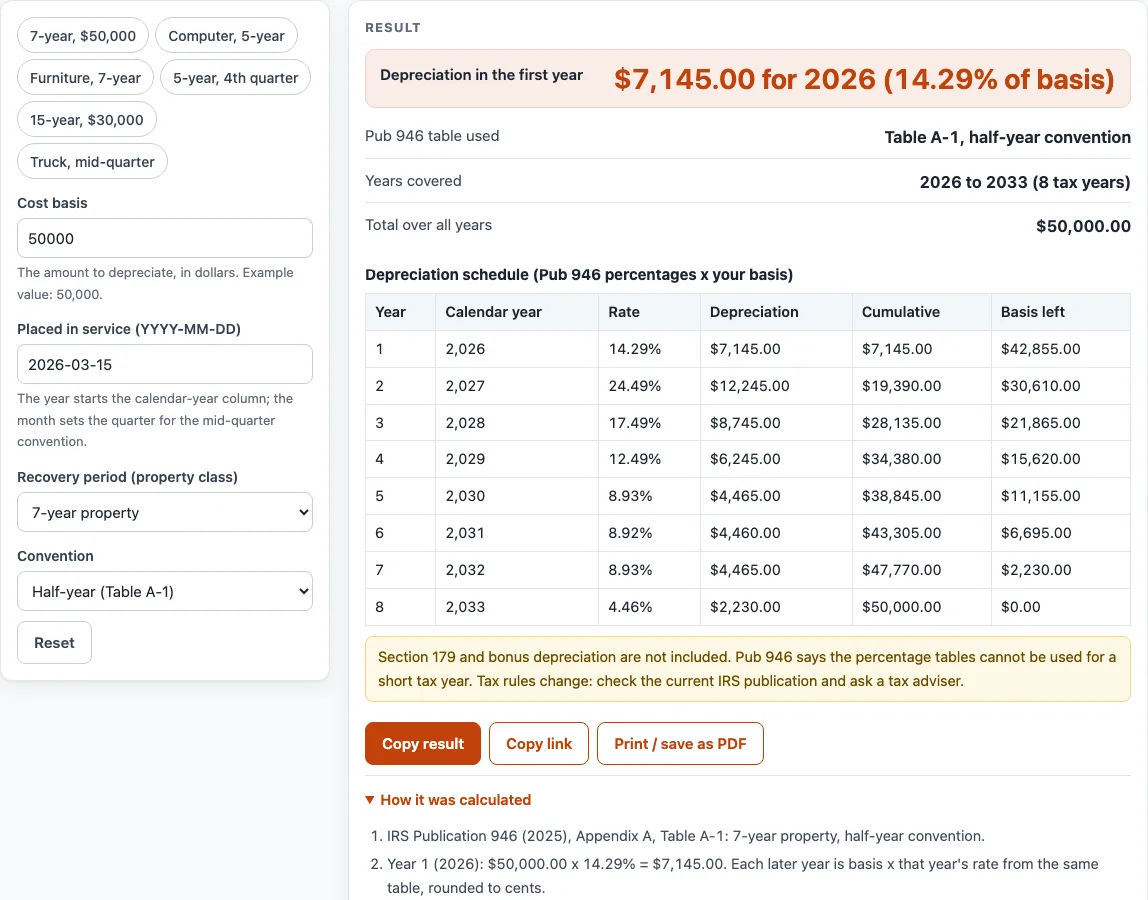
- The calculator starts with a “Cost basis” of 50,000, a “Placed in service” date of 2026-03-15, a 7-year “Recovery period” and the half-year convention.
- Set the “Cost basis” to the figure you want to test. Leave 50,000 in place if you want to follow the default example first.
- Enter the “Placed in service” date in YYYY-MM-DD form, such as 2026-11-20. The tool checks that the date is a real calendar date, leap years included, between 1987 and 2100.
- Pick a “Recovery period” between 3 and 20 years. The default is 7-year.
- Choose a “Convention”. Half-year uses Table A-1 and is the default. Mid-quarter takes the quarter from your placed-in-service date and uses Table A-2, A-3, A-4 or A-5.
- Read the outputs: “Depreciation in the first year”, “Pub 946 table used”, “Years covered” and “Total over all years”.
- Scroll to the schedule table. Check each row’s year number, calendar year, rate, depreciation, cumulative amount and basis left.
- Look for any note under the results. A half-year result placed in the last 3 months shows a note about the 40% test. Any leftover cents are reported so you can see the rounding.
- If your asset matches one, load a preset: 7-year $50,000, Computer 5-year, Furniture 7-year, 5-year 4th quarter mid-quarter, 15-year $30,000, or Truck mid-quarter ($65,000, 5-year). Then change the inputs as needed.
Presets only fill in the controls. They do not change the rules, so check each result against your own dates and recovery period.
What does a MACRS depreciation calculator actually work out?
The calculator spreads a cost basis over a recovery period using the percentages in IRS Publication 946, Appendix A, Tables A-1 to A-5. The result is arithmetic on the numbers you enter, not a ruling on what you may deduct. MACRS stands for Modified Accelerated Cost Recovery System, and chapter 4 of Pub 946 covers which property class applies.
Each row of the schedule applies the table’s rate to the cost basis for that year. “Basis left” is the cost basis minus the cumulative depreciation so far. Calendar years start in the placed-in-service year, and the calculator assumes a calendar tax year. Amounts are rounded to cents each year. For example, a 5-year mid-quarter schedule for 10,000 placed on 2026-11-20 gives 500 in 2026, then 3,800, 2,280, 1,368, 1,094 and 958. Those six amounts add up to 10,000.
The percentages come from the IRS Publication 946 (2025) PDF, which is the single source used here. All 30 columns across the tables sum to exactly 100.
The 7-year default shows the effect. A basis of 50,000 placed in service on 2026-03-15 on the half-year convention gives 7,145 in 2026, then 12,245, 8,745, 6,245, 4,465, 4,460, 4,465 and 2,230 in 2033. These total 50,000. The two 4,465 amounts and the 4,460 follow the Pub 946 rates of 8.93%, 8.92% and 8.93%.
How do the half-year and mid-quarter conventions change the schedule?
The half-year convention uses Table A-1 and is the default. The mid-quarter convention uses Tables A-2 to A-5, and the table depends on the quarter of the placed-in-service date. Jan–Mar is the first quarter, Apr–Jun the second, Jul–Sep the third, and Oct–Dec the fourth, assuming a calendar year.
Using the same asset with a 2026-02-01 date and a 5-year mid-quarter setting uses Table A-2 and gives 3,500, 2,600, 1,560, 1,101, 1,101 and 138. The totals again match 10,000.
Pub 946 describes a 40% test that decides whether the mid-quarter convention is required. This calculator does not compute that test. Read the Pub 946 text yourself. A half-year result placed in the last 3 months shows a note about the test for that reason. The tables cannot be used for a short tax year. Section 179 and bonus depreciation are not included. Tax rules change, so check the current publication and a tax adviser.
Sources (checked 15 October 2026): irs.gov · irs.gov
Worked examples
| Input | Result |
|---|---|
| $50,000.00, placed in service 2026-03-15, 7-year, Half-year (Table A-1) | $7,145.00 in 2026 |
| $10,000.00, placed in service 2026-11-20, 5-year, Mid-quarter (quarter from the date) | $500.00 in 2026 |
| $10,000.00, placed in service 2026-02-01, 5-year, Mid-quarter (quarter from the date) | $3,500.00 in 2026 |
| $120,000.00, placed in service 2025-07-01, 15-year, Half-year (Table A-1) | $6,000.00 in 2025 |
| $8,500.00, placed in service 2024-02-29, 3-year, Half-year (Table A-1) | $2,833.05 in 2024 |
Calculated by the tool above; open it with the same values to see each step.
Frequently asked questions
Is the schedule the same as what I file on my return?
It is calculated from the inputs you enter, using the Pub 946 tables. It does not include Section 179 or bonus depreciation, so your return may differ. Check the current IRS publication and a tax adviser before you use any figure.
What is the difference between half-year and mid-quarter?
Half-year uses Table A-1 and is the default setting. Mid-quarter takes the quarter from the placed-in-service date and uses Tables A-2 to A-5. The two conventions give different yearly amounts for the same cost basis.
Why does my result show a note about the last 3 months?
A half-year result placed in October, November or December shows a note about the 40% test in Pub 946. The calculator does not run that test, so read the publication to see whether the mid-quarter convention applies to you.
Can I use this for a short tax year?
No. Pub 946 says the tables cannot be used for a short tax year, so the schedule should not be used for one.
What does “basis left” mean?
“Basis left” shows the cost basis remaining after the depreciation for each year has been subtracted. It reaches zero in the final year, apart from any leftover cents the page reports.
Are my numbers uploaded anywhere?
No. The calculator runs in your browser and uploads nothing. It is free and needs no sign-up.
Related tools
- Equipment Depreciation Calculator: use it to compare depreciation approaches for equipment you own.
- MACRS Depreciation Table: use it when you want to read the Pub 946 percentages directly.
- Equipment Loan Calculator: use it to work out loan payments on equipment.
- Equipment Lease Calculator: use it to compare lease payment arithmetic for equipment.
- Heavy Equipment Loan Calculator: use it for loan arithmetic on heavy equipment.
- Semi Truck Loan Calculator: use it for loan arithmetic on a semi truck.
- Tractor Loan Calculator: use it for loan arithmetic on a tractor.
- Trailer Loan Calculator: use it for loan arithmetic on a trailer.