MACRS Depreciation Table
Pick the recovery period and convention to see the IRS Publication 946 percentage for every year; type a cost basis to get dollar amounts and the check that they total 100%.
Recent
Your last 10 settings, saved only in this browser. Nothing is uploaded.
How to use the MACRS Depreciation Table
- Open the “Recovery period” control and choose 3, 5, 7, 10, 15 or 20-year property. The default is 5-year.
- Set “Convention” to Half-year (Table A-1), or to a mid-quarter option: 1st quarter (A-2), 2nd quarter (A-3), 3rd quarter (A-4) or 4th quarter (A-5). The default is half-year.
- If you want dollar amounts, type a figure into “Cost basis”. It is optional and defaults to 10,000. Leave it empty to see percentages only.
- Read the list under “Rate for each year”. These are percentages of basis, in tax-year order.
- Check “Tax years the table spans” to see how many years the schedule covers.
- Check “Rates add up to”. For every class and convention it reads 100.00%.
- Read “Year 1 amount on your basis” for the first-year dollars, then “All years on your basis” for every year.
- If you chose a mid-quarter convention, read the warning about Pub 946’s 40% test. The page does not run this test, so check your own purchase dates against the publication.
Presets fill the controls for you: 5-year half-year, 7-year $25,000, 3-year $8,000, 15-year $80,000, 5-year 4th quarter, and Percentages only. A second table shows every class side by side for the convention you picked, and a third lists examples of property in each class from Pub 946 chapter 4. Those examples are not the full lists.
What is a MACRS depreciation table?
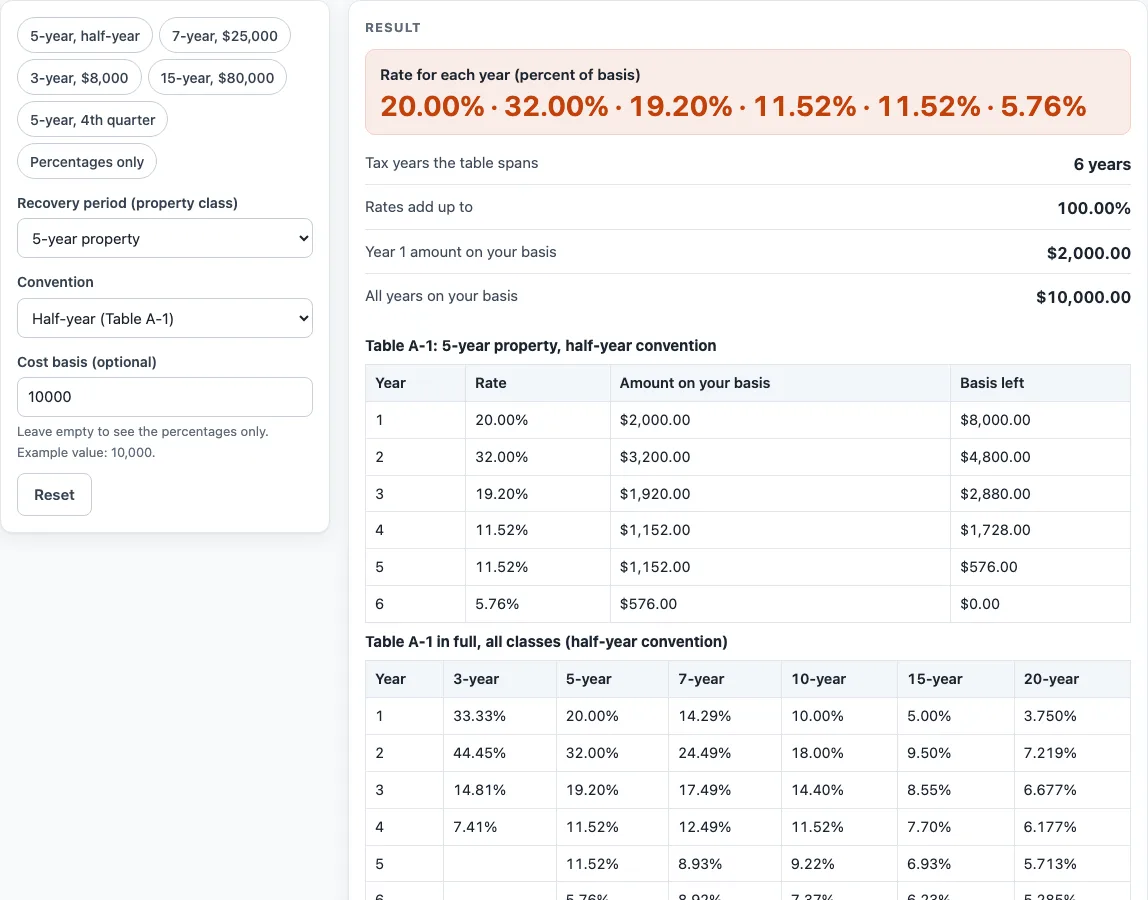
A MACRS depreciation table is a list of fixed percentages. You multiply each percentage by the cost basis of a piece of property to get the depreciation for that tax year. The page’s default example uses 5-year property, half-year convention and a basis of 10,000. The rates are 20.00%, 32.00%, 19.20%, 11.52%, 11.52% and 5.76%. Multiplied by the basis, they give 2,000, 3,200, 1,920, 1,152, 1,152 and 576 across six tax years, which total 10,000.
Each dollar amount is the cost basis times the rate, rounded to cents. The rates for every class and convention add up to exactly 100.00%, so the full basis is recovered by the end of the table. The rates are printed to two decimals, and the 20-year column is printed to three. If rounding leaves a difference of a few cents, the page shows a warning.
How do the recovery period and convention change the rates?
The recovery period sets how many years the schedule runs, and so how many rows the table has. 3-year property has 4 rows, 5-year has 6, 7-year has 8, 10-year has 11, 15-year has 16 and 20-year has 21. The convention sets when the property is treated as placed in service during the year. Half-year uses Table A-1. Mid-quarter uses Tables A-2 to A-5, depending on the quarter the property was placed in service.
Pub 946 says the mid-quarter convention applies when the depreciable bases of property placed in service in the last 3 months of the tax year (with the exclusions the publication lists) are more than 40% of the bases of all MACRS property placed in service during the year. The page shows a warning about this test when a mid-quarter convention is selected, but it does not run the test for you. The same basis can produce quite different yearly amounts under different conventions. For example, 7-year property at 10,000 on half-year gives 1,429, 2,449, 1,749, 1,249, 893, 892, 893 and 446. Pub 946’s own furniture example uses 8.93% (893) and 4.46% (446). For 5-year property placed in service in the 4th quarter (Table A-5), the same basis gives 500, 3,800, 2,280, 1,368, 1,094 and 958.
Pub 946 also says the percentage tables cannot be used for a short tax year. Section 179 and bonus depreciation are not part of this table. The page shows the arithmetic on your numbers only. Tax rules change, so check the current IRS publication and a tax adviser before you rely on any result.
Sources (checked 15 October 2026): irs.gov · irs.gov
Worked examples
| Input | Result |
|---|---|
| 5-year property, half-year convention, basis $10,000.00 | year 1 rate 20.00%, 6 tax years |
| 7-year property, half-year convention, basis $25,000.00 | year 1 rate 14.29%, 8 tax years |
| 5-year property, mid-quarter convention, fourth quarter, basis $10,000.00 | year 1 rate 5.00%, 6 tax years |
| 3-year property, mid-quarter convention, first quarter, basis no basis | year 1 rate 58.33%, 4 tax years |
| 15-year property, half-year convention, basis $80,000.00 | year 1 rate 5.00%, 16 tax years |
Calculated by the tool above; open it with the same values to see each step.
Frequently asked questions
Where do the percentages come from?
The percentages come from IRS Publication 946 (2025), Appendix A. Table A-1 is used for the half-year convention, and Tables A-2 to A-5 are used for the mid-quarter convention. They cover 3-, 5-, 7-, 10-, 15- and 20-year property.
Why do the rates add up to 100.00%?
Over the full recovery period, the rates for each class and convention total exactly 100.00%. This means the whole cost basis is depreciated by the end of the table.
Why do I see a rounding warning?
Each year’s dollar amount is rounded to cents. When the rounded amounts differ from the basis by a few cents, the page shows a warning to tell you.
Does this table include section 179 or bonus depreciation?
No. Section 179 and bonus depreciation are not included, so the figures show only the percentage schedule from the table.
Can I use the table for a short tax year?
Pub 946 says the percentage tables cannot be used for a short tax year. Check the publication for the rules that apply to your case.
Is this tax advice?
No. The page only performs arithmetic on the numbers you enter. Tax rules change, so check the current IRS publication and a tax adviser before you decide anything.
Related tools
- MACRS Depreciation Calculator: Use it when you want the depreciation worked out for a specific cost basis and placed-in-service date.
- Equipment Depreciation Calculator: Use it when you want to see how a piece of equipment loses value over its useful life.
- Equipment Loan Calculator: Use it when you want to work out loan payments for buying equipment.
- Equipment Lease Calculator: Use it when you want to compare lease payments on equipment.
- Heavy Equipment Loan Calculator: Use it when you are financing heavy equipment and want the payment arithmetic.
- Tractor Loan Calculator: Use it when you are financing a tractor and want to estimate payments.
- Semi Truck Loan Calculator: Use it when you are financing a semi truck and want to estimate payments.
- Trailer Loan Calculator: Use it when you are financing a trailer and want to estimate payments.