Maintenance Work Order Template
Choose the sections and the number of parts and labor rows, then print the blank work order or download the same sheet as a CSV.
Recent
Your last 10 settings, saved only in this browser. Nothing is uploaded.
How to use the Maintenance Work Order Template
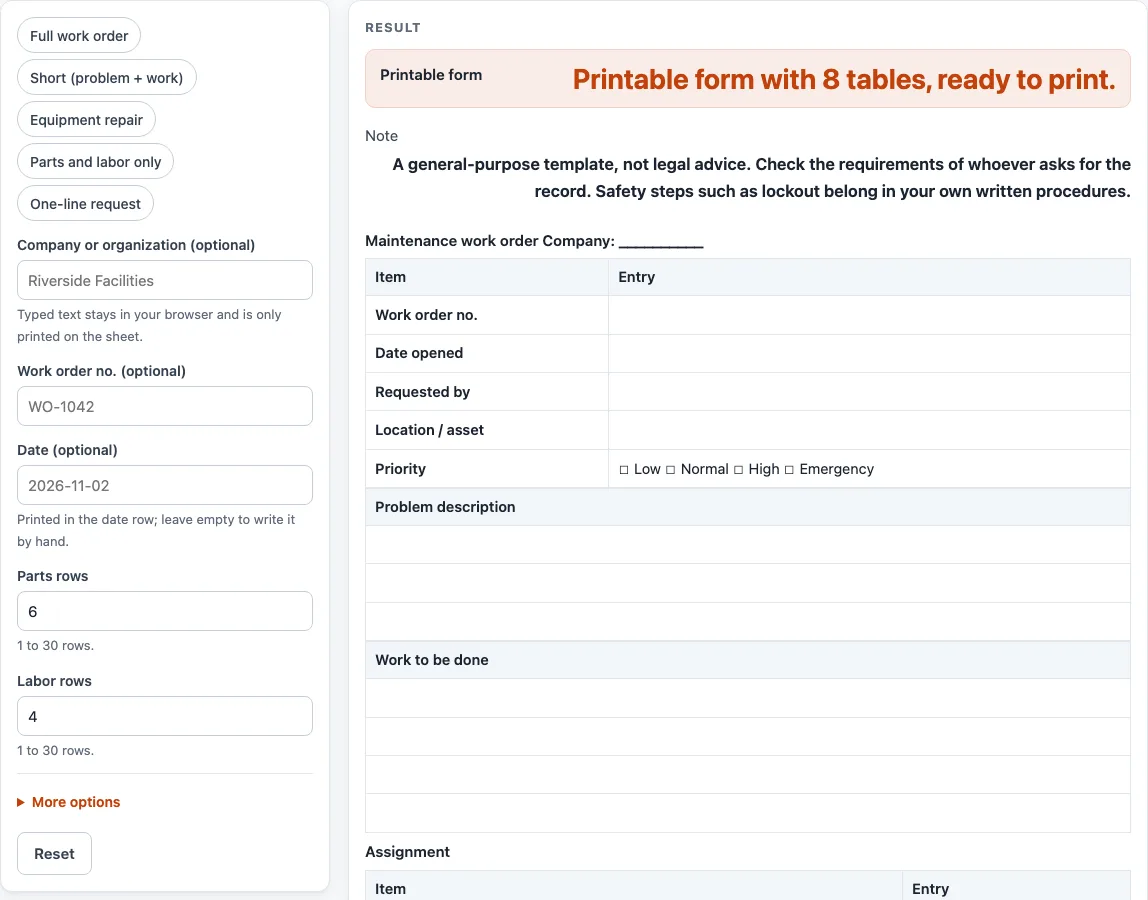
- Pick a preset: “Full work order”, “Short (problem + work)”, “Equipment repair”, “Parts and labor only” or “One-line request”.
- Open More options to switch sections on or off. The “Lockout/tagout lines” block is off by default and on in the “Equipment repair” preset.
- Fill in the optional “Company or organization (optional)”, “Work order no. (optional)” and “Date (optional)” fields.
- Set “Parts rows” and “Labor rows”. Each takes 1 to 30 rows. The defaults are 6 parts rows and 4 labor rows.
- Tick or untick “Problem description”, “Work to be done”, “Assignment block”, “Parts and materials table”, “Labor table”, “Completion block” and “Signatures” to match the job.
- Leave the “Lockout/tagout lines” off unless the job needs a place to write your own procedure name and who applied and removed the locks or tags.
- Print the sheet and fill in the lines by hand, or leave them blank until the job is raised.
- Check the “Printable form” output and its result sentence, “Printable form with {n} tables, ready to print.”
Click the Print button to print the sheet. To keep a copy for a spreadsheet, use “Download as CSV (opens in Excel)”. The CSV is made in your browser. If you enter 0 or text in a row field while that table is on, the tool shows an error. If you enter more than 30, the sheet uses 30 and shows a warning.
What does a maintenance work order record?
A maintenance work order records one job: what was reported, what work is planned, who is assigned, what parts and labor were used, and what was found when the job was finished. The header holds the “Work order no.”, “Date opened”, “Requested by”, “Location / asset” and “Priority” fields. The form does not decide anything. It keeps the record of what the people involved wrote down.
What do the priority tick boxes mean?
The priority row has four tick boxes: “☐ Low ☐ Normal ☐ High ☐ Emergency”. The form does not define these levels for you. Agree on what each one means in your own workplace, and tick the one that matches that agreement.
Are parts and labor totals calculated for me?
No. Nothing on the sheet is calculated. The “Parts and materials table” has rows for “Part or material”, “Qty” and “Cost”. The “Labor table” has rows for “Technician”, “Date”, “Hours” and “Rate”, and it adds a “Total hours” row. You write the totals by hand or in your own spreadsheet.
When should lockout or tagout lines be used?
Use the “Lockout/tagout lines” block when the job involves locking or tagging equipment. It adds blank lines for a “Lockout/tagout procedure (name or no.)”, “Locks / tags applied by” and “Locks / tags removed by”. The OSHA text on energy control procedures (29 CFR 1910.147) says energy control procedures outline specific steps for shutting down, isolating, blocking and securing equipment, and for placing, removing and transferring lockout or tagout devices. The page does not say whether your workplace must have such a procedure. It says to keep these steps in your own written procedure.
Who signs a maintenance work order?
The “Signatures” block has lines for “Requested by”, “Technician” and “Supervisor”. The sheet only gives each person a line to sign. It does not approve the work or decide anything. The Note on the page reads: “A general-purpose template, not legal advice. Check the requirements of whoever asks for the record. Safety steps such as lockout belong in your own written procedures.”
How is a work order different from a maintenance request?
A maintenance request asks for work to be done. A work order records the job once it is assigned and carried out. If you only need to ask for a repair, the Maintenance Request Form page is the better starting point.
Sources (checked 15 October 2026): law.cornell.edu
Worked examples
| Input | Result |
|---|---|
| 7 sections switched on | 8 tables including the header |
| 7 sections switched on | 8 tables including the header |
| 5 sections switched on | 6 tables including the header |
Calculated by the tool above; open it with the same values to see each step.
Frequently asked questions
Is this maintenance work order template free?
Yes. The tool is free, runs in your browser and needs no sign-up. Nothing you type is uploaded or stored.
Can I get a maintenance work order template in Word?
This page does not provide a Word file. Use the Print button to print the sheet and copy it into your own document, or use “Download as CSV (opens in Excel)” and open the file in Excel.
Does the form add up hours or costs?
No. Nothing is calculated. The labor table has a “Total hours” row, which you fill in yourself.
How many parts and labor rows can I use?
Each table takes 1 to 30 rows. The defaults are 6 parts rows and 4 labor rows. If you enter more than 30, the sheet uses 30 and shows a warning. If you enter 0 or text, you will see an error while that table is on.
Does this form cover lockout and tagout rules?
The form is a general-purpose template and is not legal advice. Check the requirements of whoever asks for the record. The optional lockout lines only give you blanks to write the name of your own procedure and who applied and removed the locks or tags. The page does not say whether your workplace must have such a procedure; keep it in your own written procedures.
Are the company, number and date I type saved anywhere?
No. Text in the optional company, number and date fields is only placed in the header of the sheet you print or download. Nothing is stored or uploaded.
Related tools
Construction Work Order Template: use this when the job is on a building site or construction project.
HVAC Work Order Template: use this for heating, ventilation and air conditioning service calls.
Maintenance Request Form: use this when you need to ask for maintenance before any work is assigned.
Plumbing Work Order Template: use this for plumbing repairs and water-related jobs.
Preventive Maintenance Checklist: use this for routine upkeep tasks rather than a single repair job.
Preventive Maintenance Schedule: use this to lay out recurring maintenance tasks over time.