Preventive Maintenance Checklist
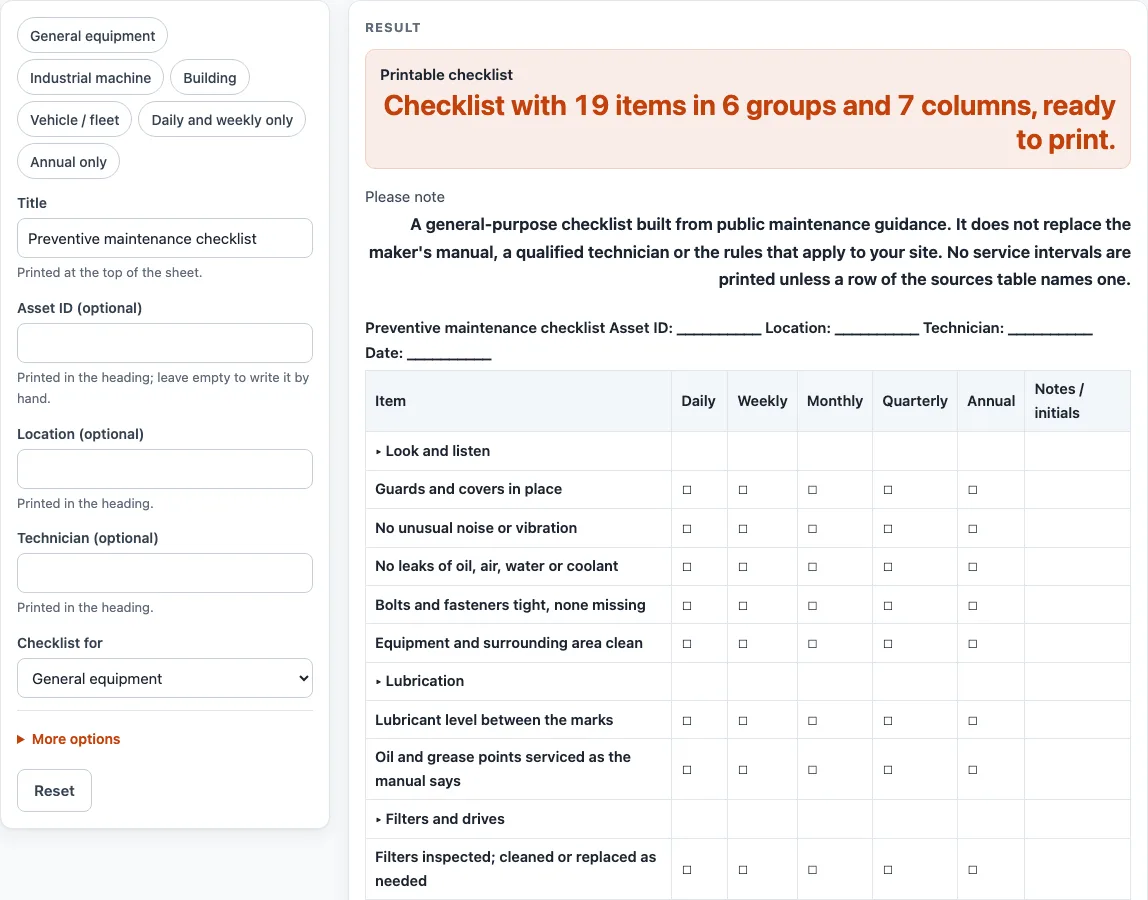
Pick the kind of equipment, choose which daily, weekly, monthly, quarterly and annual boxes you want, then print the checklist or download it as CSV (also an industrial or maintenance checklist template).
Recent
Your last 10 settings, saved only in this browser. Nothing is uploaded.
How to use the preventive maintenance checklist
- Open “Checklist for” and choose “General equipment”, “Industrial machine”, “Building” or “Vehicle / fleet equipment”. Each choice loads its own item groups.
- Change “Title” if you want a different heading. The default is “Preventive maintenance checklist”.
- Fill in “Asset ID (optional)”, “Location (optional)” and “Technician (optional)”. Leave any of them empty to write it in by hand on the printed sheet. Typed text is cut at 80 characters.
- Open More options and switch the time columns on or off: “Daily column”, “Weekly column”, “Monthly column”, “Quarterly column” and “Annual column”.
- Keep “Notes / initials column” on if you want space to sign off each item.
- Set “Blank write-in rows” from 0 to 20 to add empty rows at the end of the list.
- Leave “Add the table of what public sources say” on to include the sources table, or switch it off.
- Check the “Printable checklist” on the page, then print it with Print / save as PDF, or select “Download as CSV (opens in Excel)” to save preventive-maintenance-checklist.csv.
If you switch on more than 9 columns, the tool warns you that they will print narrow, so switch a few off. If you switch off every check column, each item gets a single Done box. Because nothing is stored, print or download your sheet before you close the page.
What goes on a preventive maintenance checklist?
A preventive maintenance checklist lists the checks a person makes on equipment at set points, and records what they found. Items are grouped by the kind of check. For general equipment the groups are look and listen, lubrication, filters and drives, motor and electrical (visual), controls and safety, and records. The general equipment list has 16 items in 6 groups, the industrial machine list has 21 items in 7 groups, the building list has 15 items in 6 groups, and the vehicle and fleet list has 15 items in 5 groups.
Most items come from public guidance, such as the DOE compressed air sourcebook and the PNNL and FEMP building and HVAC pages. Some items were added by us as general checks with no source behind them, and the printed sheet does not mark which is which. Compare every item with the maker’s manual before you rely on it. The optional sources table on the sheet quotes five attributed statements about timing and records; it is not a list of sources for each item. The DOE/FEMP O&M guide says it supplements, and in no way replaces, the manufacturer’s recommendations. For an industrial preventive maintenance checklist, compare the lockout item and the emergency stop item with your own site procedures.
A good sheet also records the date, the work done and the parts replaced. The DOE compressed air sourcebook recommends recording the dates of all maintenance and repairs, including a list of all parts replaced or serviced. The “Records” group on each sheet gives room for this.
How often should preventive maintenance be done?
No single public source gives one interval for a general machine, so this sheet prints no service intervals. The DOE sourcebook says manufacturer intervals are primarily designed to protect the equipment, and that it often makes sense to maintain more frequently. The FEMP guide says it supplements, and in no way replaces, the manufacturer’s recommendations. The two statements point in slightly different directions, and the sheet shows both and leaves the choice to you.
Other sources give figures for specific equipment, and those figures differ by equipment. The DOE sourcebook gives a typical rule of thumb to examine and adjust V-belts after every 400 hours of operation, and says to follow the maker’s tension requirements. It also says motors should be lubricated per the manufacturer’s specification, anywhere from every 2 months to every 18 months depending on annual hours and motor speed. These are quoted, attributed figures, not targets for your equipment. Use the monthly, quarterly and annual columns to record what the manual or your own plan says, and tick the boxes when the work is done.
Sources (checked 15 October 2026): energy.gov · www1.eere.energy.gov · pnnl.gov · energy.gov
Worked examples
| Input | Result |
|---|---|
| 7 columns | 19 item rows, 7 columns |
| 7 columns | 24 item rows, 7 columns |
| 5 columns | 20 item rows, 5 columns |
| 5 columns | 18 item rows, 5 columns |
| 6 columns | 16 item rows, 6 columns |
Calculated by the tool above; open it with the same values to see each step.
Frequently asked questions
Is this a free maintenance checklist template?
Yes, the tool is free, runs in your browser and needs no sign-up. You can change the title, equipment type, asset details and columns, then print the sheet or download it as a CSV file.
Does the checklist tell me how often to service my equipment?
No. The boxes are for you to tick when the maker’s manual or your own plan says the work is due. The optional sources table quotes what named public sources say about timing, and the sources differ.
Can I use this as an industrial preventive maintenance checklist?
Yes. Choose “Industrial machine” under “Checklist for” to load 21 items in 7 groups, including the “Safety first” group. Add your own items in the “Other (write in)” rows if your machine needs checks not on the list.
Is my information saved or uploaded?
No. Nothing is stored or uploaded, so anything you type disappears when you close the page. Print or download the sheet before you leave.
Where do the checklist items come from?
Most items follow public guidance, such as the DOE compressed air sourcebook and the PNNL building and HVAC pages. Some were added by us as general checks with no source, and the sheet does not mark which is which. Check every item against the maker’s manual before you use it on your equipment.
Why do my printed columns look cramped?
When more than 9 columns are switched on, the columns print narrow. Switch off the time columns you do not need under More options.
Related tools
Air Compressor Maintenance Checklist: use it when your sheet covers a compressed air system and you want compressor-specific items.
Generator Maintenance Checklist: use it when you inspect a standby or portable generator.
HVAC Preventive Maintenance Checklist: use it when your building’s heating, ventilation and air conditioning needs a dedicated sheet.
Preventive Maintenance Schedule: use it when you want to plan when each task falls due, not just record what you found.
Preventive Maintenance Checklists: see all the preventive maintenance checklist pages in one place.
Forklift Maintenance Checklist: use it when the equipment is a forklift.