Semi Truck Loan Calculator
Enter the truck price, down payment, rate and term, and an optional balloon payment, to get the monthly payment, total interest and payoff table.
Recent
Your last 10 settings, saved only in this browser. Nothing is uploaded.
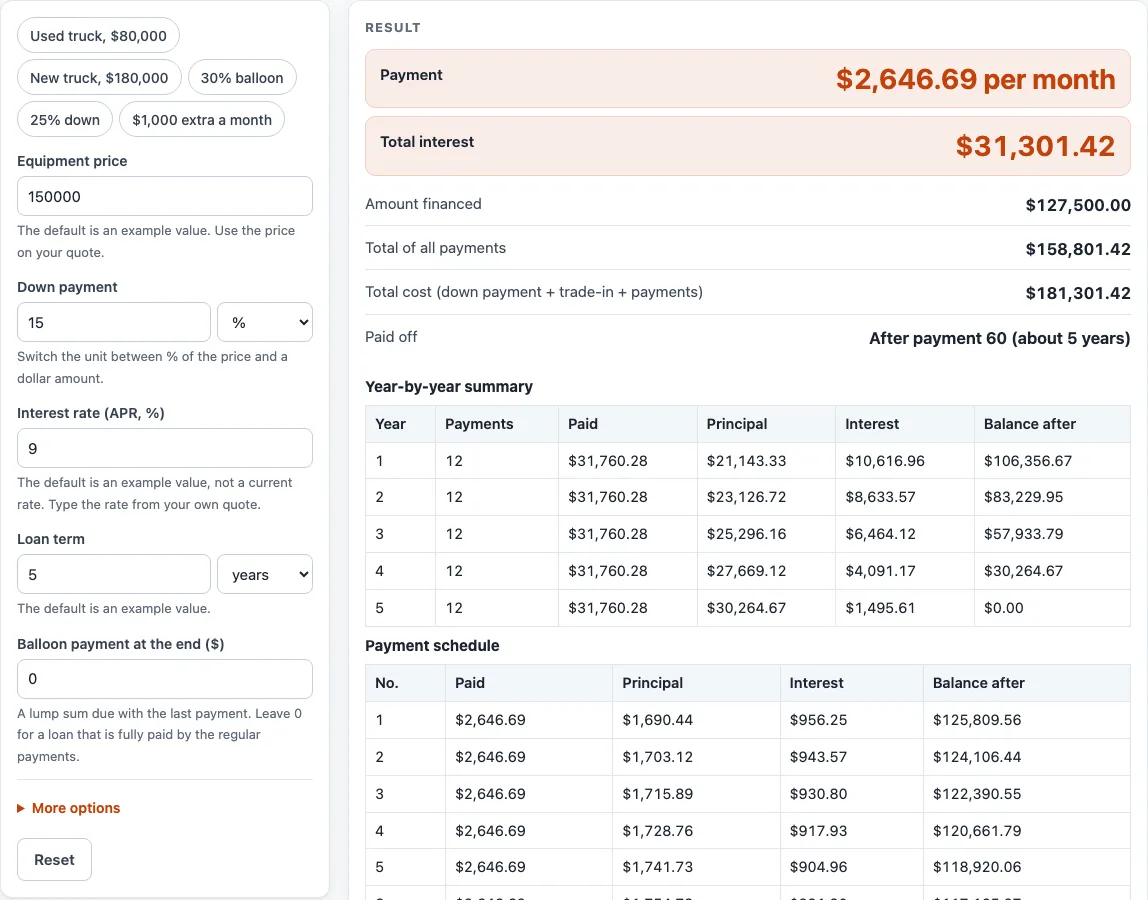
How to use the Semi Truck Loan Calculator
- Enter the price of the truck.
- Enter the down payment and choose % of the price or a dollar amount.
- Enter the interest rate (APR, %), the yearly interest rate.
- Enter the loan term and choose years or months.
- If the loan ends with a lump sum, enter it in “Balloon payment at the end ($)”. It is due with the last payment.
- To test extra payments, enter an amount in “Extra payment each period ($)”. The page shows the time saved and interest saved against the same loan without it.
- Open More options. If you have a trade-in, enter the trade-in credit in dollars.
- Type the sales tax rate for your area. Rules vary by place, so use the rate you were quoted.
- Tick “Charge tax only on price minus trade-in” if tax should be charged on the price minus the trade-in. Leave it clear to charge tax on the full price.
- Enter any fees financed, and type a first payment date as YYYY-MM-DD if you want dates in the schedule.
- Read the payment, then check “Total interest”, “Total of all payments”, and “Total cost”. Scroll to the year-by-year summary table and the payment schedule, which shows the first 120 rows.
Change one input at a time when you compare two loan options. That makes it clear which number caused each difference in the totals.
How is the monthly payment calculated?
The payment is P × i ÷ (1 − (1 + i)^−n). P is the amount financed, i is the APR divided by payments per year, and n is the term multiplied by payments per year. This tool uses monthly payments, so the periodic rate is the APR divided by 12 and n is the term in months. At a 0 % rate, the payment is simply P divided by n.
How do sales tax and fees change the amount financed?
The amount financed is the price, minus the down payment and trade-in, plus sales tax and fees. Sales tax is charged on the full price, or on the price minus the trade-in when the box is ticked. The tool does not look up tax rates, so the rate you type is the rate it uses. Fees are added to the amount financed in the same way as tax.
How does a balloon payment change the last payment?
A balloon payment is a lump sum due with the last regular payment. The regular payment becomes PMT = (P − B ÷ (1 + i)^n) × i ÷ (1 − (1 + i)^−n), where B is the balloon amount. The last payment is the regular payment plus the balloon. For example, a loan of 150,000 less 15 % down, at 9 % over 60 months, with a 30,000 balloon, gives a payment of $2,248.94 a month and a last payment of about $32,248.94, which is the regular payment plus the balloon.
Why do the totals depend on the payment schedule?
Total interest, the total of payments, and total cost come from a payment-by-payment schedule. That schedule uses the unrounded payment, while a lender rounds the payment to the cent. Each period’s interest is charged on the balance still owed, so early payments carry more interest and later payments carry more principal. Lenders may calculate interest and fees differently from this plain arithmetic, so their totals can differ.
How do extra payments reduce the cost of a loan?
Each extra payment is added to every regular payment and lowers the balance sooner. Later interest is then charged on a smaller balance, which is why the loan can be paid off earlier and cost less. The page compares the result with the same loan without extra payments and reports the time saved and interest saved.
Sources (checked 15 October 2026): openstax.org · openstax.org
Worked examples
| Input | Result |
|---|---|
| $150,000.00 at 9 % for 5 years | $2,646.69 per month, interest $31,301.42 |
| $150,000.00 at 6.5 % for 3 years | $3,907.75 per month, interest $13,178.92 |
| $150,000.00 at 9 % for 5 years | $2,646.69 per month, interest $27,222.12 |
Calculated by the tool above; open it with the same values to see each step.
Frequently asked questions
Is this semi truck loan calculator free to use?
Yes. It is free, runs in your browser, and does not upload anything. You do not need to sign up.
Can I use it for a commercial truck loan?
Yes. The same arithmetic applies to any loan where you enter a price, down payment, trade-in, sales tax rate, fees, APR, and term. The results are only as accurate as the numbers you type.
Does the calculator tell me whether a loan is a good deal?
No. It calculates the payment and totals from the numbers you enter. It does not judge whether a loan suits your business or your finances, and it is not financial or tax advice.
What is the payment if the rate is 0 %?
At 0 %, the payment is the amount financed divided by the number of payments. No interest is added, so total interest is zero.
Can I see dates in the payment schedule?
Yes. Type a first payment date, and the schedule shows a date on every row. The schedule lists the first 120 payments; the year-by-year summary above it covers all of them.
How can I compare two loan offers?
Run the calculator once for each offer and keep every input the same except the one you want to compare, such as the APR or the term. Then compare the payment, “Total interest”, and “Total cost” for each run.
Related tools
- Equipment Depreciation Calculator: Use it to estimate how the value of equipment may decline over time, using your own inputs.
- Equipment Lease Calculator: Use it when you are comparing a lease with a loan for equipment.
- Equipment Loan Calculator: Use it when you are estimating a loan for equipment that is not a truck.
- Heavy Equipment Loan Calculator: Use it when you are financing large machinery rather than a truck.
- MACRS Depreciation Calculator: Use it when you want to work through MACRS depreciation on your own figures.
- MACRS Depreciation Table: Use it when you want to look up the MACRS depreciation table.
- Tractor Loan Calculator: Use it when you are estimating a loan for a tractor.
- Trailer Loan Calculator: Use it when you are estimating a loan for a trailer.